
The “Create User” and “Promote User” integrations allows you to automatically grant new users access to the membership area on your site. This is a built-in integration, you can set this up directly from the Integrations tab in the Product Settings.
How to Create a User After a Product Purchase #
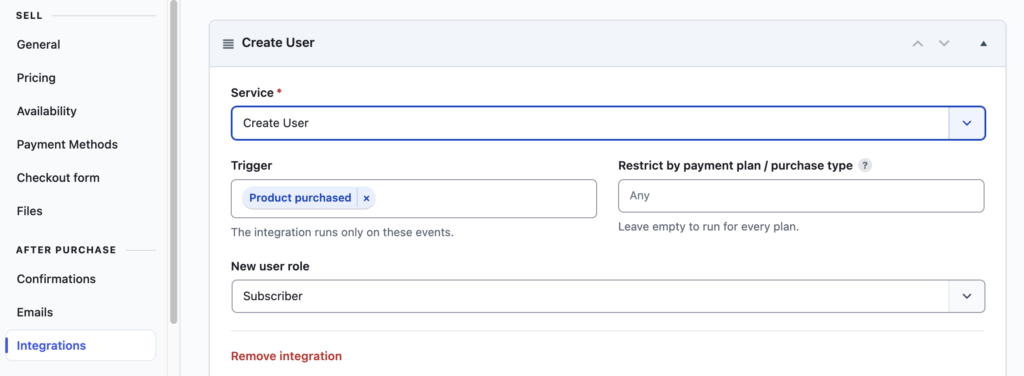
Go to the Integrations tab in your Product Settings and select Create User from the Services menu. Then select the level of access you want to give your customer from the New User Role dropdown.
In the example below the following will occur from the settings chosen. When a product is purchased with any payment plan a new user is added as a subscriber to the website.
Here’s a video guide to this feature:
How to Promote a User After a Product Purchase #
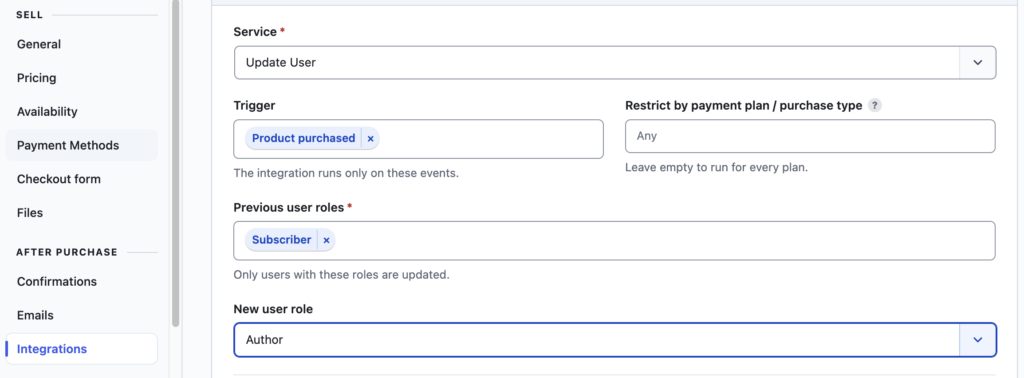
Go to the Integrations tab in your Product Settings and select Update User from the Services menu. Then select the level of access you want to give your customer from the New User Role dropdown.
In the example below the following will occur from the settings chosen. When a product is purchased with any payment plan a user in the Subscriber role is promted to the Author role.
Here’s a video guide to this feature: