
This requirement ensure that all the links in your content (both external and internal) use a valid link format.
This feature won’t check the destination URL, but it will check the link format to make sure you haven’t used URLs such as htpps// or .nt.
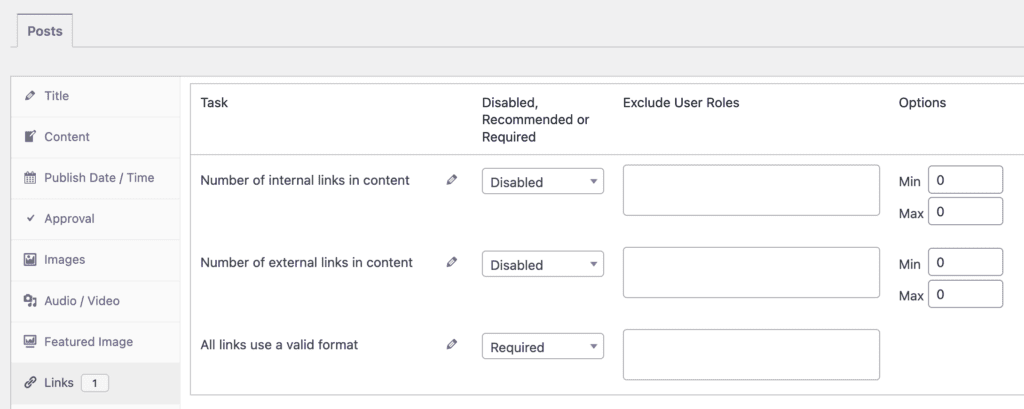
- Click the “Links” tab. The screenshot below shows the internal links option.
- You can choose from “Disabled, Recommended, or Required” options.
If you enable this link validation option, it will be visible when you edit content. If you have broken links in your content, this task will be marked in red in the sidebar:

If you’re using the block editor, PublishPress Checklists will add a warning sign next to any blocks that do contain an invalid link, as in this screenshot below.
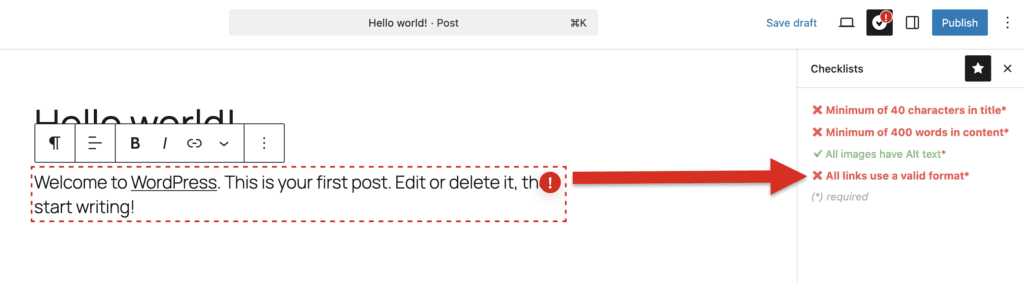
If you do not have broken links, this task will be marked in green in the sidebar:

The Checklists plugin uses these regular expressions to check for broken links. You will find this code in this file: /core/Utils/HyperlinkValidator.php
preg_match('/^(?:https?:\/\/(?:www\.)?[-a-zA-Z0-9@:%._\+~#=]{1,256}\.[a-zA-Z0-9()]{1,6}\b(?:[-a-zA-Z0-9()@;:%_\+.~#?&\/\/=*]*)|tel:\+?[0-9\-]+|mailto:[a-z0-9\-_\.]+@[a-z0-9\-_\.]+?[a-z0-9@\.\?=\s\%,\-&_;*]+)$/i', $link);