
By default, WordPress users in the admin area can see all the Posts on the site. This happens regardless of whether or not users can edit those posts.
You can prevent this from happening by installing the PublishPress Permissions plugin.
How to hide posts that users can not edit #
After you install the PublishPress Permissions plugin, go to Permissions > Settings > Editing. Uncheck the “Lists other user’s uneditable posts” box.
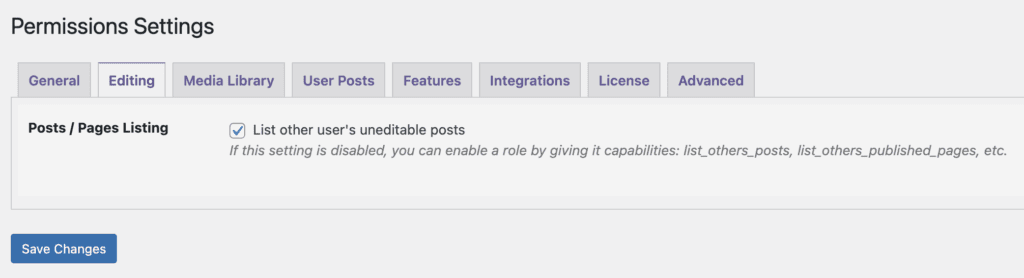
That’s it. This will block users from seeing Posts that they can not edit. When users go to “Posts” screen, they only see their posts.
The image below shows what a user can see on a WordPress site before PublishPress Permissions is installed and correctly configured.

And this next image shows what the same user sees after the plugin is activated and configured. Notice that the numbers across the top of the screen have changed. For example, “Published” has dropped from 20 to 8 and “Scheduled” has dropped from 28 to 20.

Hide posts that users can not edit, for specific user roles #
In this guide, we’ll show you how to selectively allow some user roles to see other people’s posts.
This guide is normally only required for users with restricted permissions on your site. This is because if any user role has the “edit” capability for a post type, the “list” capability is not required. So users in the Administrator role will always be able to see other users’ content because they have the edit_posts and edit_pages capabilities.
In this guide, we’ll use the Contributor role. If you have PublishPress Permissions installed, a Contributor will only be able to see the posts they have written, as in this image below:

- Install the PublishPress Capabilities plugin.
- Click “Capabilities” in your WordPress admin menu.
- Choose the “Contributor” role.
- We are going to enable these two checkboxes:
list_others_posts
list_published_posts
Now when a Contributor goes to the “Posts” screen, they will be able to see posts from all users.
