The PublishPress Shortlinks plugin gives you
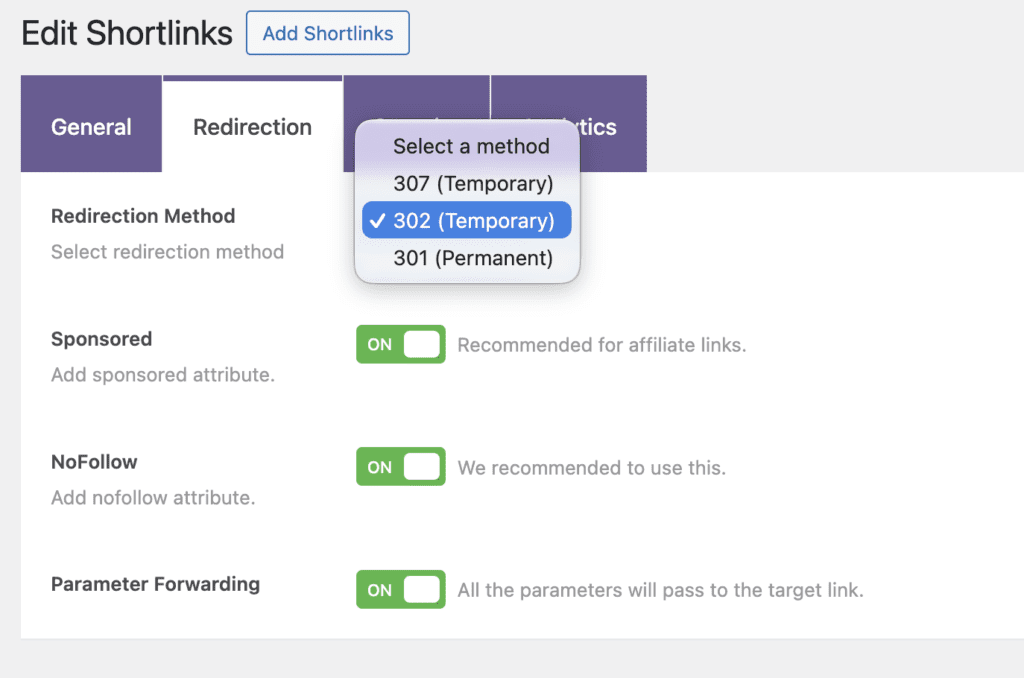
Go to Shortlinks > All Shortlinks in your WordPress admin menu. Choose a shortlink to edit then click the “Redirection” tab.
With the first setting, you can choose what kind of redirect is used for each link.
- 302 and 307 (Temporary) redirects tell search engines that the requested URL has been moved temporarily, but will be back eventually.
- 301 (Permanent) redirects are used to tell search engines that a requested URL has been permanently moved to another URL. If you’re confident that your target URL will never change, then use this redirect type.
There are also three more settings available:
- Sponsored: This adds rel=”sponsored” to your links. This attribute was introduced by Google to indicate links that result from advertisements or paid placements.
- NoFollow: This adds rel=”nofollow” to your links. This attribute tells search engines not to pass authority (ranking credit) to the linked page.
- Parameter Forwarding: This option makes sure that any query string data from an original URL will be carried over to destination URL. This is normally used for tracking or maintaining session information, such as
?utm_source=google.