
Table of Contents
This doc will give you a general overview of how the integration settings work. It explains the various Triggers and Payment Plan options available and how they apply to your products.
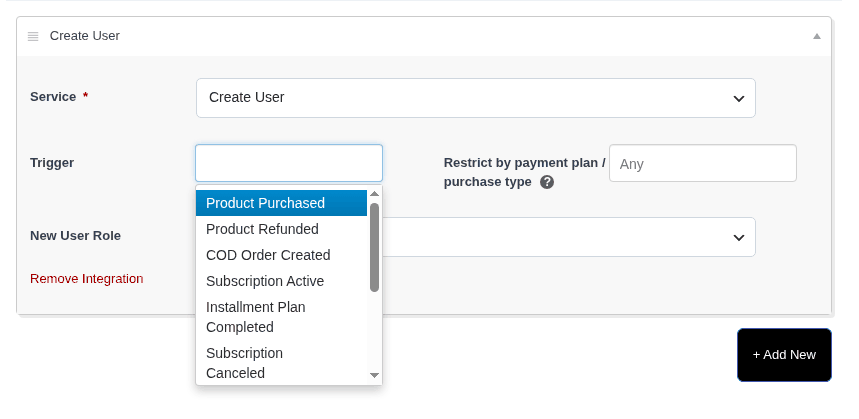
Triggers #
- Product Purchased – The integration will run after a successful purchase
- Product Refunded – The integration will run after a refund is submitted
- COD Order Created – The integration will run after a pending order is created with a “Cash on Delivery” payment method
- Subscription Active – The integration will run after the first subscription payment has been processed
*If there is a trial period, the integration will not run until the trial has ended and the first subscription payment has been made - Subscription Completed – If an end date is selected on a subscription, the integration will run when that date is reached
- Subscription Canceled – The integration will run after the subscription has been canceled
- Subscription Paused – The integration will run after the subscription has been paused
- Subscription Charged – The integration will run after a renewal subscription payment has been charged
- Subscription Charge Failed – The integration will run after a renewal subscription payment fails
- Lead Captured (2-step form only) – The integration will run after a customer has filled out Step 1 of a 2-step checkout form
Payment Plans #
Use this field to restrict the integration to a specific payment plan you created for this product or one of the other available options below.
- Any (blank)– Leave this field blank to apply the integration to all available payment plans for this product
- Bump, Upsell, 2nd Upsell – The integration will run if this product has been purchased as the [product type] for another product
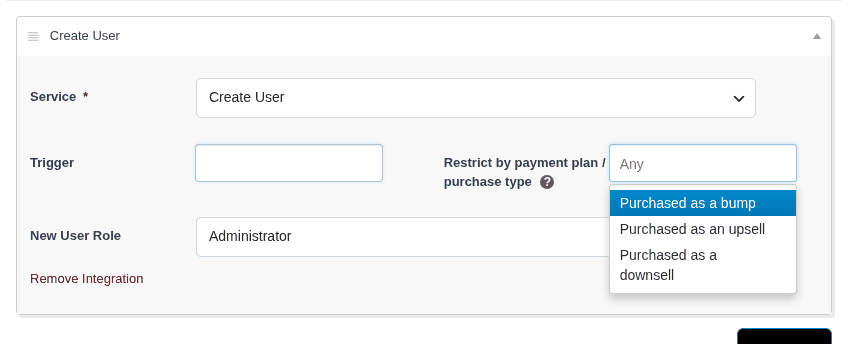
Note: If you would like to set an integration for a bump or upsell on product (A) you will need to set the integration on the bump or upsell product (B).