
Table of Contents
The PublishPress Permissions plugin can prevent users from viewing all the posts in a specific content type.
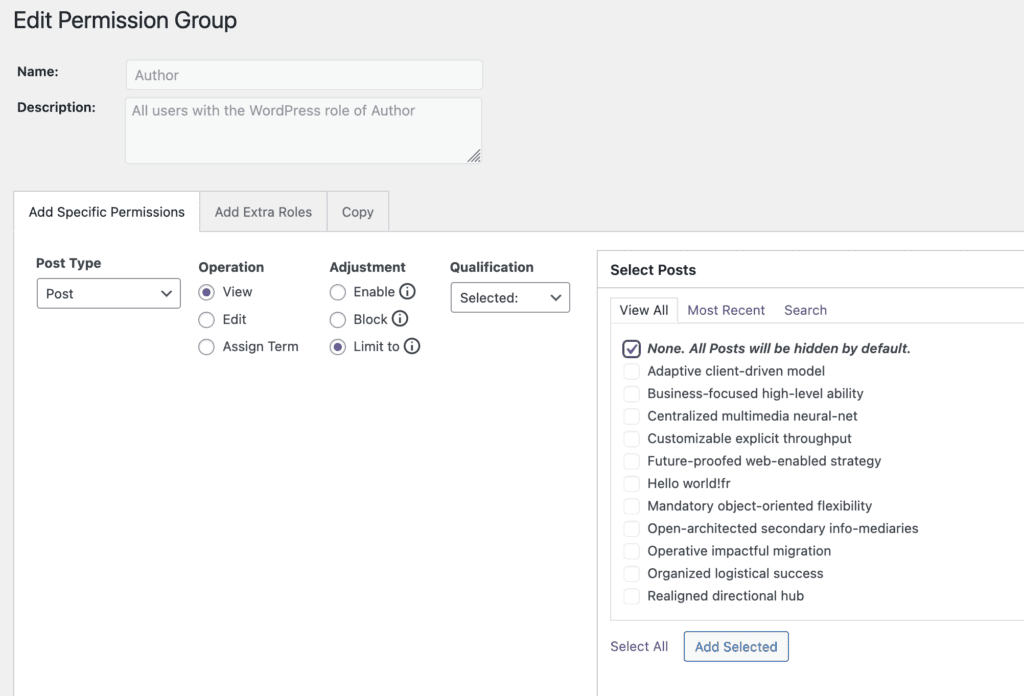
How to Block Access to a Post Type #
- Go to “Permissions” in the WordPress admin menu.
- Click to edit a user role or group.
- Under “Post Type”, select the post type you want to control.
- Under “Operation”, choose “View”.
- Under “Adjustment, choose “Limit to”.
- Under “Select Posts”, choose “None. All Posts will be hidden by default”.
Why not have a “Block All” button? #
A few users have asked us about setting “Limit to” and “None”. They wonder if would be simper to choose “Block” and then “All”.
The answer to this lies in WordPress and SQL work. The “Enable”, “Block”, and “Limit to” operations mirror the database query's WHERE clause:
- “Block” adds a restrictive “AND ID NOT equal to” with a list of blocked post IDs.
- “Enable” adds an expansive “OR ID equal to” with a list of enabled post IDs.
- “Limit To” addds a limiting “AND ID equal to” with a list of enabled post IDs.
Although from the user's perspective, it might make sense to have a single “Block All” posts, we have chosen not to implement this for two reasons:
- The list of post IDs to block would be continually growing.
- It would be inefficient to append a list of all post IDs into the database query.
For these reasons, we don't use the Block All” approach because it would make the database bloated. So instead, we recommend using the “Limit to” option.