Table of Contents
This feature requires the Pro version of the PublishPress Authors plugin.
It is possible to expand the Author profiles for the PublishPress Authors plugin with custom fields. This is a feature of the Pro version.
By default, PublishPress Authors allows you to enter basic user details for each author:
- First Name
- Last Name
- Avatar
- Website
- Job Title
- Biographical Info
If you're using PublishPress Authors Pro, you can add your own fields to author profiles. The current field options are:
- Text
- Multiline Text
- WYSIWYG Editor
- Link
Add a New Field #
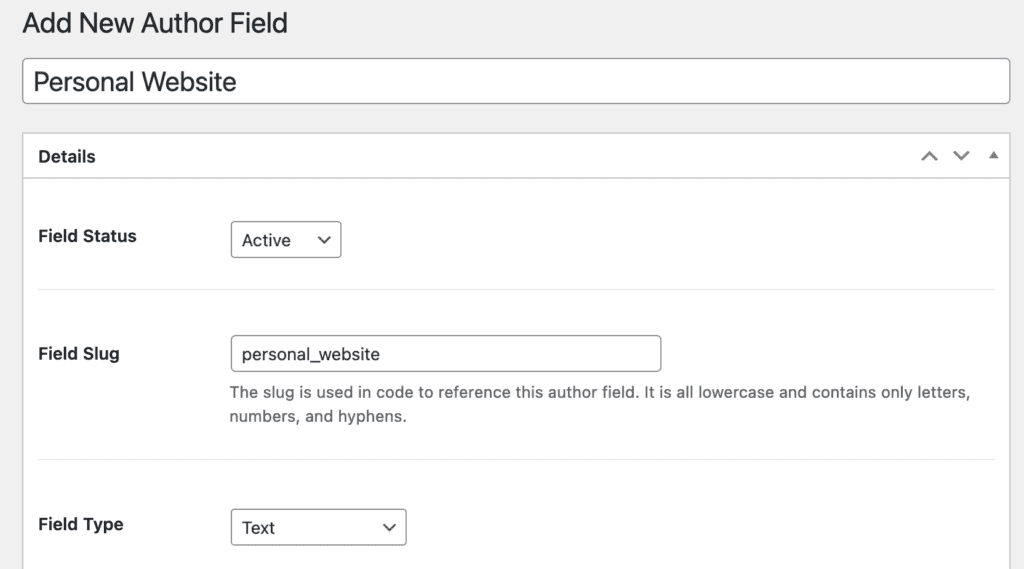
- Go to Authors > Author Fields.
- Click “New Author Field”.

- Enter a title for your field. In the image below, I choose “Personal Website”.
- Enter a “Field Slug”. This is key because it is how you will add your field to the frontend layout.
- Choose a “Field Type”.
- You can also enter a description. This appears under the fields in the admin area and helps users understand their choice.
Enter Data for The New Field #
- Go to “Authors” in your WordPress admin.
- Click “Edit Author Profile” for an author.
- Fill in your new field.
Add the Field to Your Layout #
The final step in adding fields is to include them in your Author Box.
- Go to “Authors” then “Author Boxes”.
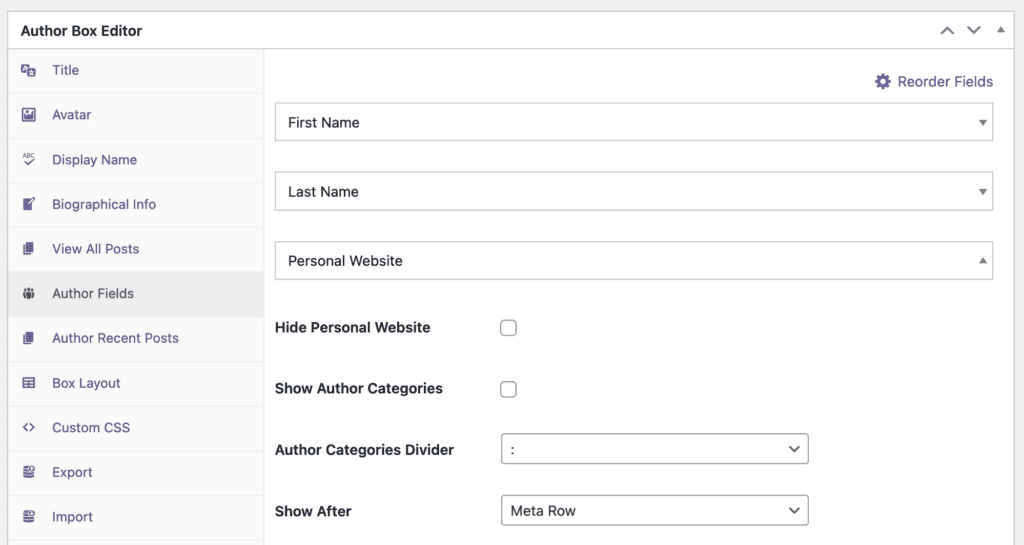
- Go to the “Author Fields” tab.
- In this area, you can customize each field. For example, in this screenshot below we are customizing the “Personal Website” field: