This feature requires the Pro version of the PublishPress Capabilities plugin.
The PublishPress Capabilities Pro plugin allows you to add new links in your WordPress admin menu. You can do this via the “Admin Menus” screen in PublishPress Capabilities Pro.
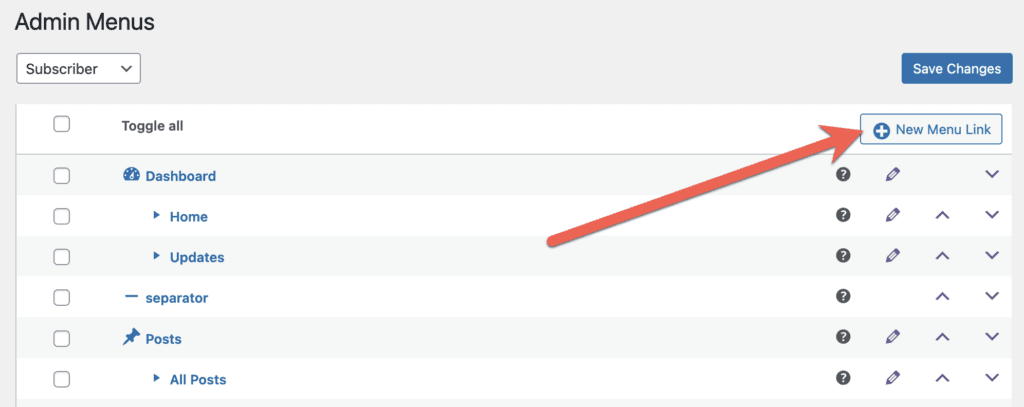
To add a new menu link, click the “New Menu Link” button shown in the screenshot below:
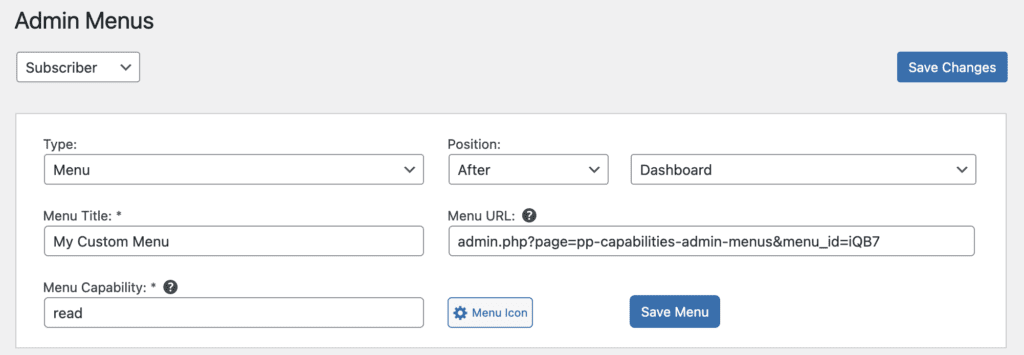
There are several choices you can make for each new menu link:
- Type: Choose from “Menu”, “Submenu”, “Menu Separator”, or “Submenu Separator”.
- Position: Choose to display this new link either “After” or “Before” a specific menu link.
- Menu Title: This is the text that users will see.
- Menu URL: This can be either an internal or external URL.
- Menu Capability: This is the capability required to see the menu link. “read” is the default and will give access to anyone in the WordPress admin area. Choose “manage_options” to restrict the link only to administrators. You can check who has each capability via the Capabilities screen.
- Menu Icon: This is icon that users will see.