
This feature requires the Pro version of the PublishPress Future plugin.
“On custom action” is one of the triggers available in the “Action Workflows” feature of the PublishPress Future Pro plugin. This allows you to integrate PublishPress Future with custom code or third party plugin. You can specify a WordPress action hook and when that hook runs it will trigger your workflow.
There is also a similar step available called “Do action” which allows you to activate a hook during a workflow.
We will need these details for the integration:
- Hook: Enter the name of the hook that will trigger the workflow.
- Argument name: You can enter as many arguments as you want. The arguments will pass to the action. These arguments will also be available as variables in subsequent workflow steps.
- Data type: Choose from the following options:
- Integer
- String
- Boolean
- Object
- Array
- Post User
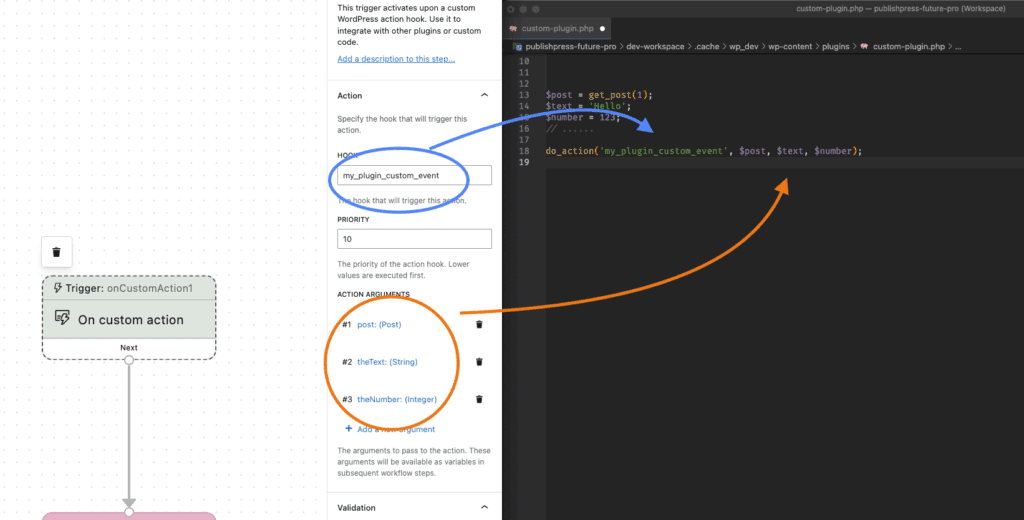
Let’s see an example of the “On custom action” trigger. In this example, when the my_plugin_custom_event trigger runs, the workflow will start.
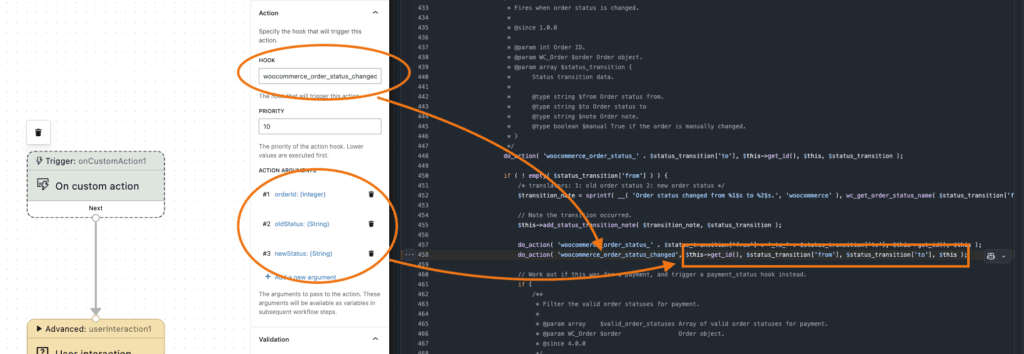
In this second example, we’re integrating PublishPress Future Pro with WooCommerce. The hook is woocommerce_order_status_changed. When an order status is changed in WooCommerce, the workflow will start to run.
There is one current exception to the hooks that can be used by “On custom action”. That exception is for actions that pass custom variable types, such as a WooCommerce order object instead of a post object. Some hooks, like woocommerce_new_order will provide 2 arguments: $orderId, and $order.$orderId is an integer number and we support that. However $order is an object of the class WC_Order and we do not currently provide that as a Data Type. The closest data type we have is “Object”. Setting that argument as object still allows to receive it in the trigger, but if you try to use it as a variable, none of its properties are accessible.