
Table of Contents
PublishPress Permissions makes it possible to control who can edit content with a specific taxonomy attached. For example, you can create a tag called “Admin Editing Only” and make sure that only people in the “Administrator” role can edit posts with that tag.
Control Editing for Individual Terms #
These steps will show you how to control viewing access for a single term.
- Install the PublishPress Permissions plugin.
- Go to Posts > Categories.
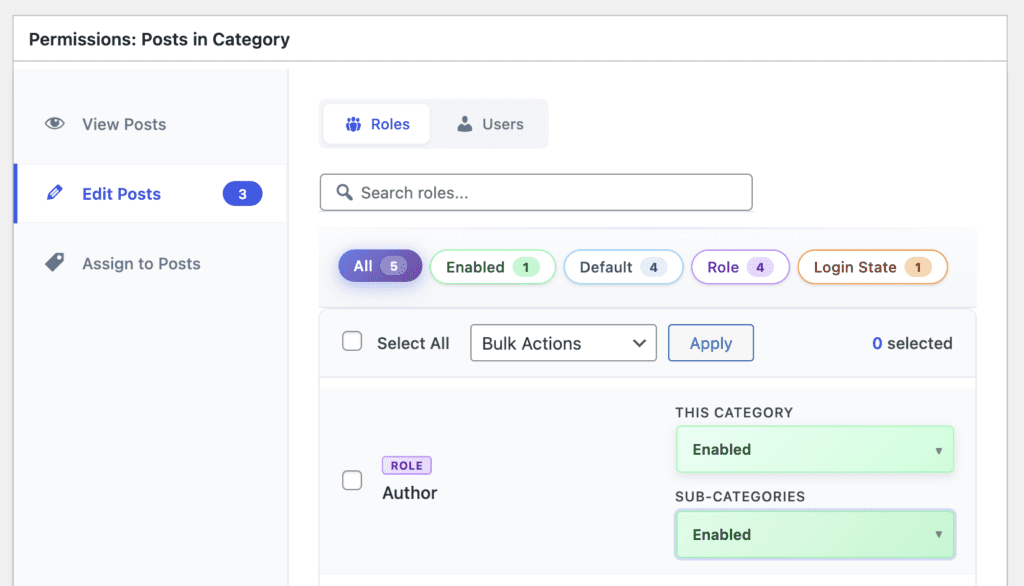
- Open the category that you want to control editing access for.
- Find the “Permissions: Posts in Category” box.
- Click the “View Posts” tab.
- This feature allows you to choose “Enabled” or “Blocked” for any user role or login state.
- Enabled: Anyone in this user role can edit posts with this Category.
- Blocked: Anyone in this user role can NOT edit posts with this Category.
Control Editing for Multiple Terms #
It's also possible to control viewing permissions for multiple terms and the posts they're associated with.
- Go to “Permissions” in your WordPress admin menu.
- Choose the user role that you want to control viewing access for.
- Post Type: Choose the post type that you want to control viewing access for.
- Operation: Select “Edit”.
- Adjustment: Select “Enable” or “Block”.
- Qualification: Choose the taxonomy.
- Select Categories: Choose the terms you want to control editing access for.
- Click “Add Selected Permissions”.
- Click “Save Permissions”.
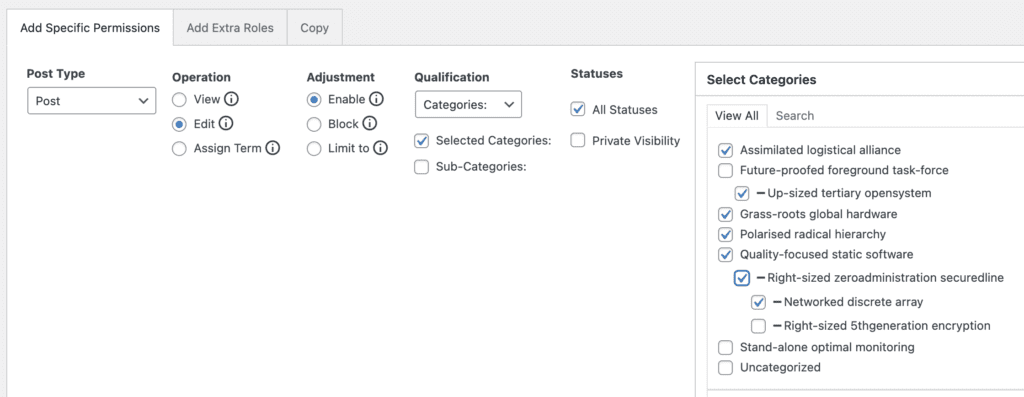
You can also choose “Limit to” under the “Adjustment” setting. This is useful if you restrict the access you grant to only the specified items.