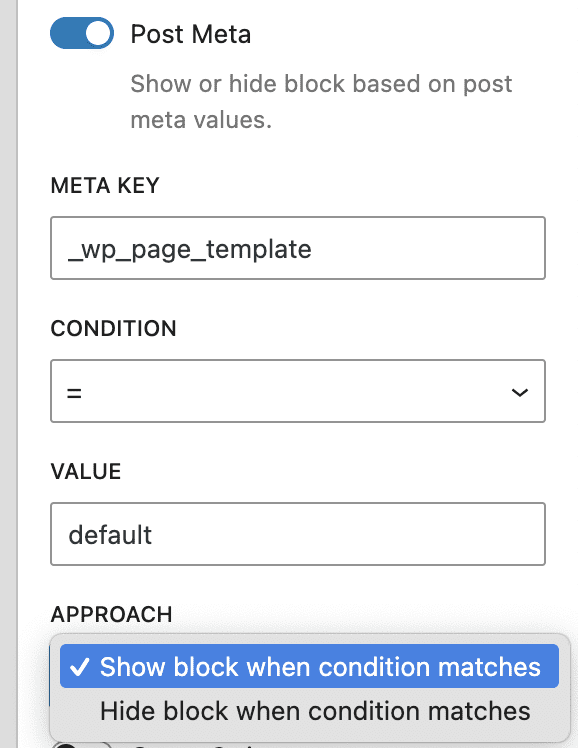
The “Post Meta Control” option is part of the Block Controls feature in the PublishPress Blocks plugin. This option allows you to show and hide blocks based on postmeta data stored for individual posts. This option works best for blocks that may show across multiple posts such as Reusable Blocks or blocks inside the Full-Site Editor.
The data used for this setting is stored in the _postmeta field in the database. you can see several example of rows in the _postmeta table.
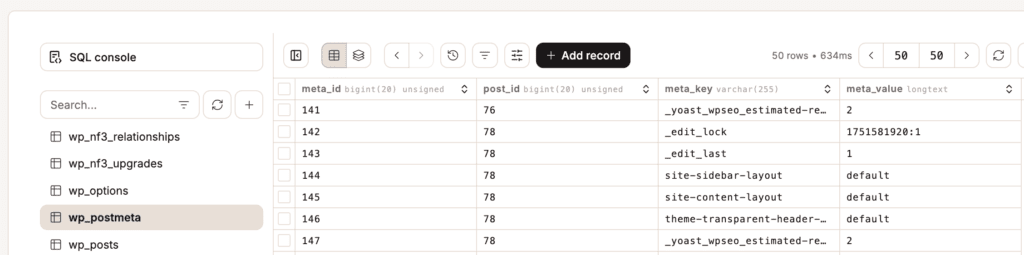
Here are the settings for the Post Meta Control feature:
- Meta Key: This is name of the meta_key field to use for this condition.
- Condition: This is based on the “Value” field. For example, if you choose = then the value of the data in the post's meta_value field must exactly match the content of the “Value” field.
- Value: This is the value of the data in the meta_value field for this post.
- Approach: You can choose either “Show block when condition matches” or “Hide block when condition matches”.
In the screenshot below, this block will only show if the _wp_page_template field for the post has a meta_value of “default”.