
PublishPress Series allows you to create custom templates the Post List Boxes, Post Details, and Post Navigation features. These custom templates accept tokens which will show data from the PublishPress Series plugin.
There is an example in the screenshot below:
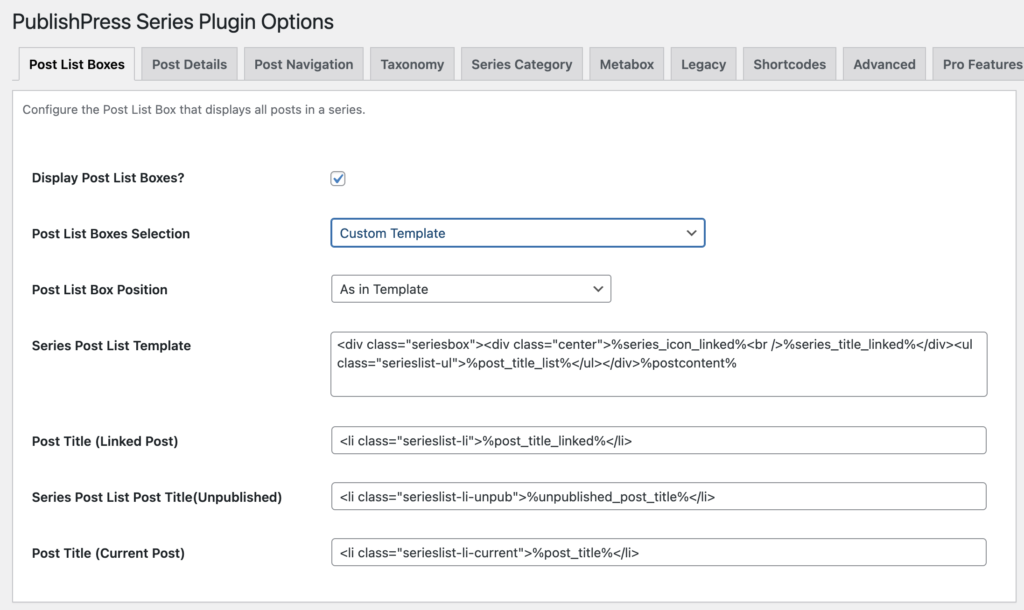
Notice in this example we have the %series_icon_linked% token. When this template is used by the plugin, %series_icon_linked% will get replaced by the series icon for the displayed series, linked to the series archive for that series.
This is a powerful template system that really extends the possibility of how series information can be displayed on your website without having to edit any WordPress theme files.
All you do is insert the tokens you wish to use in the template you want the related series or post information to display.
Tokens in the Free version of PublishPress Series #
%series_icon%This will be replaced with the series icon for a series.%series_icon_linked%Same as %series_icon% except that the series icon will be linked to the series page.%series_list%This token is for use with the orgSeries widget only. It references where you want the list of series titles to be inserted and requires that the template for each series title be also set.%series_title%This will be replaced with the title of a series.%series_title_linked%Same as %series_title% except that it will also be linked to the series page.%post_title_list%Is the location token for where the contents of the post list post templates will appear.%post_title%Will be replaced with the post title of a post in the series.%post_title_linked%Will be replaced with the post title of a post in the series linked to the page view of that post.%previous_post%Will be replaced by the navigation link for the previous post in a series. The text will be whatever is included in the ‘Custom Previous Post Navigation Text' field. If that field is empty then the text will be the title of the post.%next_post%Will be replaced by the navigation link for the next post in a series. The text will be whatever is included in the ‘Custom Next Post Navigation Text' field. If that field is empty then the text will be the title of the post.%postcontent%Use this tag either before or after the rest of the template code. It will indicate where you want the content of a post to display.%series_part%Will display what part of a series the post is.%total_posts_in_series%Will display the total number of posts in a series.%series_description%Will display the description for the series.
Tokens in the Pro version of PublishPress Series #
This feature requires the Pro version of the PublishPress Series plugin.
Extra tokens are available in the Pro version of PublishPress Series. This adds new tokens to the “Templates” screen for customizing the various series templates.
These are the extra tokens:
%series_slug%– which will output the slug of the series.%series_id%– which will output the id of the series.%post_author%– will output the author of the post.%post_thumbnail%– if the post has a feature-image then that image will be displayed.%post_date%– the date that a post was published%unpublished_post_title%– Will be replaced with the unpublished post title of a post in the series%total_posts_in_series_with_unpub%– Will display the total number of published and unpublished posts in a series.
This gives the user of PublishPress Series many new options for further customization of various displays of series information. For example, if you wanted to show the feature images of each post in a series post list you could use the %post_thumbnail% token to include it