
How to Write Anonymous Posts in WordPress
We have PublishPress customers who sometimes want to publish posts with no author attached. There are many reasons why they want anonymous blog posts. Sometimes the post is an official statement from the company and doesn’t have a single author. Sometime the post is controversial and the safe choice is not to attach a person’s name.
Whatever the reason, it’s good to have the option to have the option to make some posts anonymous. I’ll show you how it’s done in this guide.
Table of Contents
Why Publish Posts Anonymously?
Organizations often publish content anonymously when:
- Multiple people contributed to the article.
- The content represents the company rather than an individual.
- The topic is sensitive or controversial.
- The author prefers privacy.
- Guest writers do not want public attribution.
Video Guide to Anonymous Author Profiles
Here’s a video guide to creating anonymous authors on your site:
Anonymous Author vs No Author
There is an important difference between hiding the author completely and using an anonymous author profile. Hiding the author removes attribution entirely, while an anonymous author profile allows you to display a consistent identity such as “Editorial Team”, “Staff Writer”, or “Company News”.
How to Create Anonymous Author Profiles
- Install the PublishPress Authors plugin.
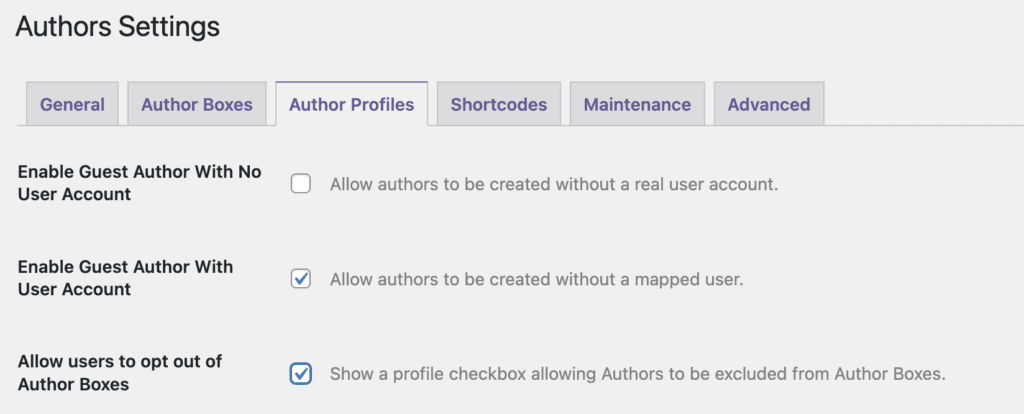
- Go to “Authors” then “Settings”.
- Click the “Author Profiles” tab.
- Check the “Allow users to opt out of Author Boxes” box.
- Click “Save Changes”.
- Go to the “Authors” screen.
- Create a new author profile. In this screenshot below, I’m making it very clear that this profile is going to be be for anonymous accounts. This guide explains the two types of author profile.

- Click the “Edit Author Profile” link under your new anonymous profile, as in this screenshot below:

- Check the box “Do not show this profile publicly”.
- Click “Update”.
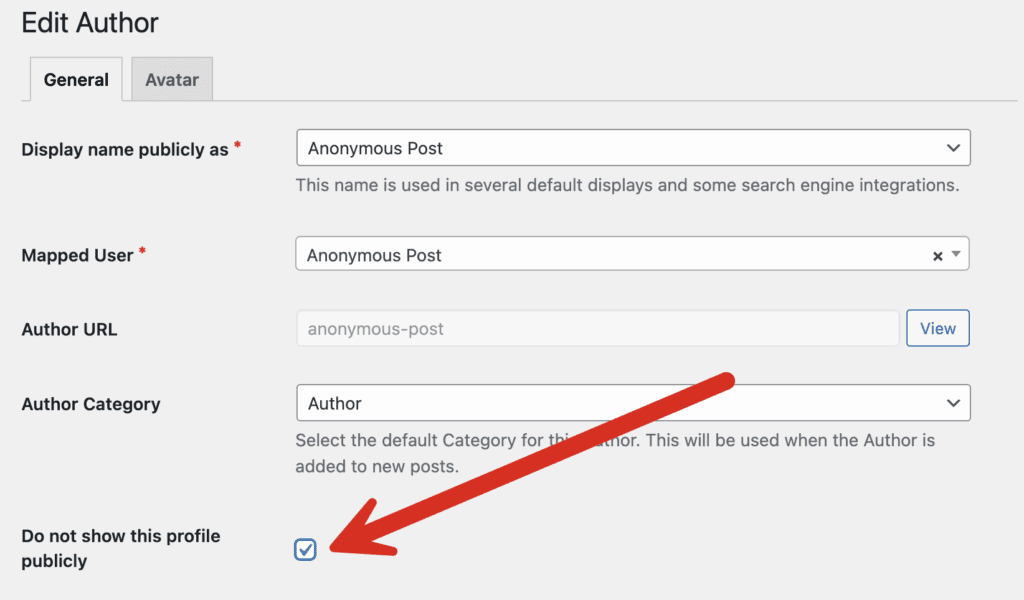
Now, whenever you want to create an anonymous post, choose this new author profile, as in this screenshot below. Any author display powered by PublishPress Authors will be automatically hidden from the frontend display.

Examples of Anonymous Author Names
Anonymous author profiles are especially useful when multiple people contribute to an article. Rather than assigning credit to a single person, you can publish under a shared profile that represents the entire team. Here are some common examples:
- Editorial Team
- Company News
- Guest Contributor
- Research Department
- Support Team
- Product Team
- Staff Writer
Does Anonymous Publishing Affect SEO?
Anonymous posts can still perform well in search engines. However, if author expertise is important in your industry, consider using a branded author profile rather than removing author information entirely. For more on how author profiles impact your site’s SEO, check out our guide to E-A-T and E-E-A-T for WordPress Publishers.
More to Consider with Anonymous Profiles
Please note that you may need to hide the default “Author” display in your theme. This is true whenever you install PublishPress Authors or any plugin that improves the default WordPress author profiles. Some themes will have a settings to remove the author display. Some allow to remove the author display via the “Customize” link or the Full-Site Editing link.
Here are different ways to display the new PublishPress Author profiles on your site. The simplest and most popular option is to use show the author profile below your posts.
More on Anonymous Profiles
Publishing anonymous posts in WordPress doesn’t have to mean removing author information entirely. With PublishPress Authors, you can create professional author profiles such as “Editorial Team”, “Staff Writer”, or “Company News” that allow content to be published under a consistent identity while protecting individual contributors. This approach is especially useful for collaborative content, corporate blogs, guest contributions, and organizations that prefer a unified brand voice.
If you’d like to learn more about managing authors in WordPress, explore our guides on adding multiple authors to a WordPress post, allowing multiple users to edit a single WordPress post, and creating custom author profiles with PublishPress Authors. You may also be interested in our tutorials on WordPress User Role Levels, allowing users to manage lower-level accounts, and granting permissions to a single user. Together, these tools help you build a more flexible, collaborative, and professional publishing workflow in WordPress.

The author profile plugin for WordPress
The PublishPress Authors plugin allows you to create beautiful profiles for your site’s authors. You can add social media links, recent posts, custom layouts and much more.
