
How to Customize Permissions for One WordPress User
This week, a PublishPress user asked us if it is possible to customize the permissions for a single WordPress user.
Their request was like this:
- “I want John to only edit Pages A, B, and C”
- “I need Jane to only view Posts D, E, and F”
This request makes a ton of sense. Normally in WordPress you’d need to make a whole new user role for this. You’d create a role called “John” and put him in that role. You’d create a role called “Jane” and put her in that role. Creating a separate role for every special case quickly becomes difficult to manage.
This is much easier with the PublishPress plugins. In this guide I’ll show you two ways to do that:
- PublishPress Capabilities: this plugin allows to create a new user role and control features for just one user.
- PublishPress Permissions: this plugin enables you to customize specific post and pages access for one user.
Table of Contents
Video guide to permissions for one user
Option #1. Access to specific features
Normally, user roles are designed for multiple users, but there is nothing to stop you creating a new role for just one user.
This is the best approach if you want to give general permissions to this user. For example, you can allow them to edit all your posts, or add new plugins. If you want to give more specific permissions, we recommend Option #2 below.
- Install the PublishPress Capabilities plugin.
- Go to the “Roles” link in your WordPress admin menu.
- Find the “Create New Role” box.
- Enter the name of your new role.
- Click the “Save Changes” button.
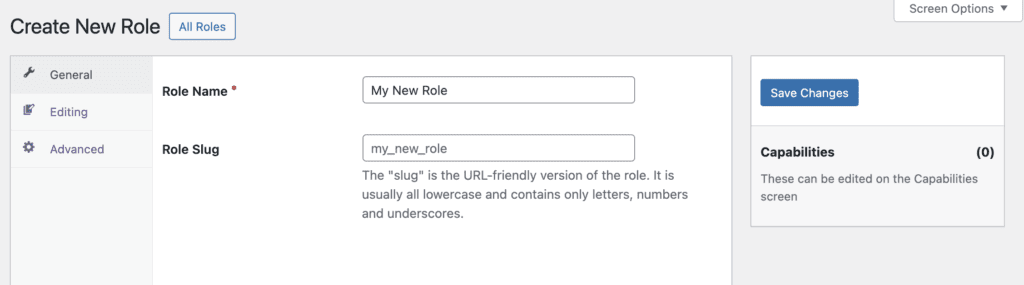
- Go to the “Capabilities” screen.
- Choose your new user role from the dropdown in the top-left corner. You can now choose the access details for this user.

- Go the “Users” screen in your WordPress admin menu.
- Select your user and add them to the new role.

Option #2. Access to specific posts and pages
This is the best approach if you want to give very specific permissions to a single user. For example, you can use approach to give the user editing access to a specific page, or posts in a specific category.
- Install the PublishPress Permissions plugin.
- Go to the “Permissions” area.
- Click the “Users” tab.
- Here you can search for individual users and choose their access levels.
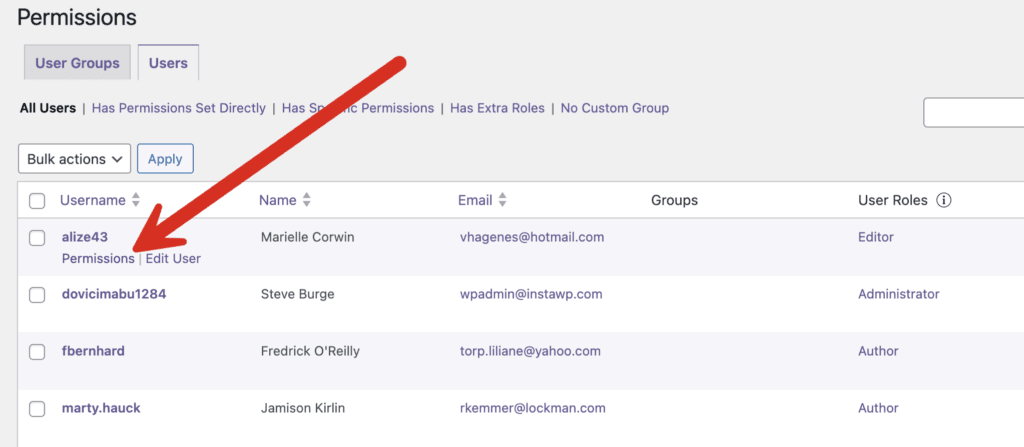
On this next screen you can decide what post, pages, and other content items can be viewed or edited by this user. For example, you can allow a user to edit specific WooCommerce products, documentation pages, or any other content type registered in WordPress.

Adding access to individual users can be better than creating roles and adding access to that role. Creating a separate role for every user can quickly become difficult to maintain. If staff members leave or responsibilities change, administrators may end up managing dozens of nearly identical roles. PublishPress Permissions allows you to keep a clean role structure while still handling exceptions for individual users.
These tutorials have more details on how to customize one user or one role:
- Allow Multiple Users to Edit a Single WordPress Post
- Allow WordPress Users to Edit Posts in Single Category
When to Use PublishPress Capabilities or PublishPress Permissions
As you saw in this guide, we do offer two plugins that allow you to control who can access what on your WordPress site. This is simple way to understand the difference:
- PublishPress Capabilities focuses on user roles.
- PublishPress Permissions controls access for individual posts, pages, or users.
We have a detailed guide comparing the two plugins. This table can also help:
| Task | PublishPress Capabilities | PublishPress Permissions |
|---|---|---|
| Allow a user to install plugins | ✅ | ❌ |
| Allow a user to activate plugins | ✅ | ❌ |
| Allow a user to edit themes | ✅ | ❌ |
| Allow a user to manage WooCommerce settings | ✅ | ❌ |
| Allow a user to access a plugin settings page | ✅ | ❌ |
| Allow a user to publish posts | ✅ | ❌ |
| Allow a user to edit all posts | ✅ | ❌ |
| Allow a user to edit all pages | ✅ | ❌ |
| Allow a user to moderate comments | ✅ | ❌ |
| Allow a user to manage categories | ✅ | ❌ |
| Allow a user to edit one specific post | ❌ | ✅ |
| Allow a user to edit one specific page | ❌ | ✅ |
| Allow a user to edit posts in one category | ❌ | ✅ |
| Allow a user to edit posts with one tag | ❌ | ✅ |
| Allow a user to access one custom post type item | ❌ | ✅ |
More on WordPress User Permissions
Granting permissions to an individual user is often the simplest way to handle exceptions without creating new roles. If you need to manage permissions across larger groups of users, see our guide to WordPress User Role Levels and learn how to allow users to manage lower-level accounts. You can also use PublishPress Permissions to limit editing access to a single category or even allow multiple users to edit the same post when collaboration is required.
Control access to your content
PublishPress Permissions allows you to enable or deny access to posts, pages, categories, tags and more. You can control who can view and edit your WordPress content.

Control your WordPress users
PublishPress Capabilities enables you to customize what users see in every area of WordPress from editing posts and pages to admin menus, profile pages.
