
Allow WooCommerce Shop Manager to Accept Payments With pay_for_order
PublishPress customers have had some challenging questions for us. In this tutorial, I’m going to explain the answer to a challenging WooCommerce question that came in recently.
One PublishPress customer has a large segment of their customer base wishing to call up and place an order over the phone. To make this happen, they need to allow users in the “Shop Manager” role to pay for customers.
So they installed PublishPress Capabilties and its User Testing feature. Using PublishPress Capabilities, the Shop Managers could log in using the customer’s account and complete the payment. In this blog post, we show you the steps needed to accomplish this.
Their problem was that even when the Shop Managers had full control over WooCommerce orders, they could not accept payments. They could not enter credit card or check information when a customer called in to place an order. They needed the Shop Manager role to be allowed to create and modify orders.
Table of Contents
How to Allow Users to Accept Payments for Others
After some research, we found the key to solving their problem was in this WooCommerce file: class-wc-shortcodes-checkout.php. This line was controlling access to the order payments:
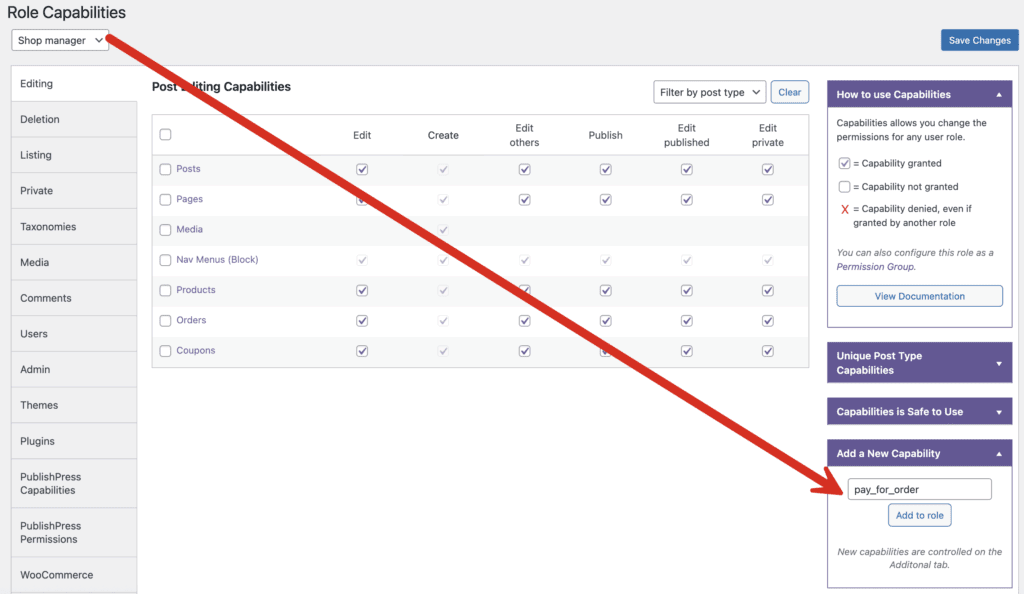
if ( isset( $_GET['pay_for_order'], $_GET['key'] ) && $order_id )The solution was to use PublishPress Capabilities, and add pay_for_order as a capability to the Shop Manager role. In the image below, I’ve illustrated how to do that with PublishPress Capabilities:
- Go to the “Capabilities” screen.
- Choose the user role, in this case “Shop manager,” in the top left corner.
- Enter “pay_for_order” into the “Add a New Capability” box.
- Click the “Add to role” button.
- Go to the “Additional” tab and make sure the “pay for order” box is checked.
Now the “Shop manager” role has the capability to create and modify orders.
WooCommerce and PublishPress Summary
WooCommerce and the PublishPress plugins are a powerful combination. You can configure the permissions on your eCommerce store to meet your exact needs.
Other examples include controlling who can manage WooCommerce coupons, creating users who can only manage WooCommerce orders, adding users who can only manage reports, and having users who can only edit products.
You can also use our plugins to clean up the WooCommerce admin screens.

Control your WordPress users
PublishPress Capabilities enables you to customize what users see in every area of WordPress from editing posts and pages to admin menus, profile pages.
