
PublishPress Revisions 3.9.2: Clearer Buttons for Publishing Revisions
This post is about a release of the PublishPress Revisions plugin. This plugin allows you safely manage changes to published posts in WordPress. You can approve all changes to posts and even schedule them to go live on a specific day.
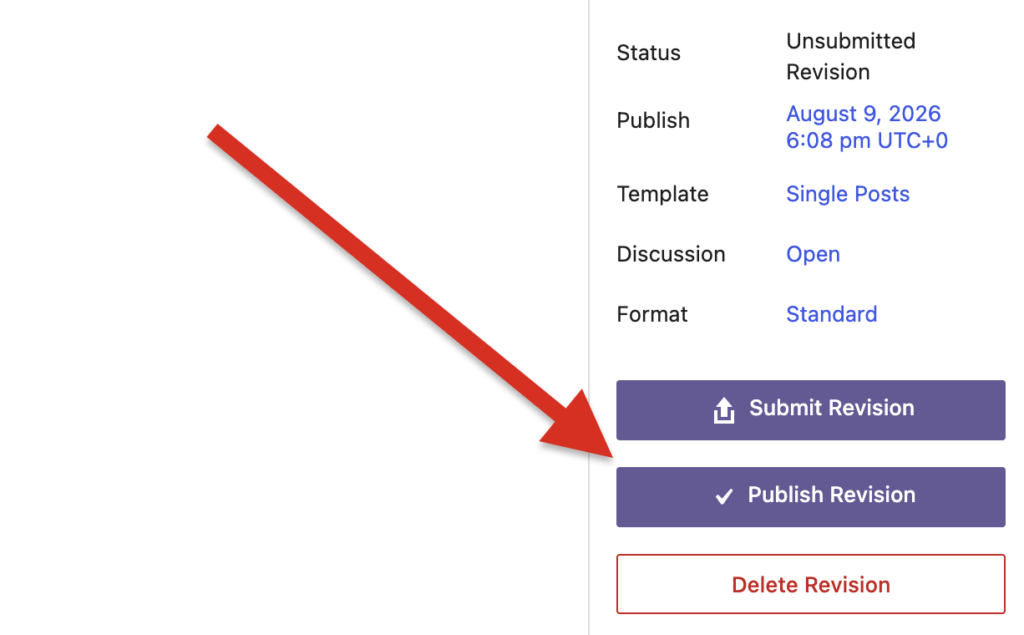
The PublishPress Revisions 3.9.2 update is a small maintenance release focused on making revision review clearer inside the WordPress editor. The main change is that the sidebar button now says “Publish Revision” instead of “Approve Revision,” which better describes the action editors are taking.
Table of Contents
Editor sidebar improvements
- Clearer publish action: The editor sidebar button now says “Publish Revision” instead of “Approve Revision,” so editors can better understand that the revision will go live.
- Smarter Decline button visibility: The “Decline Revision” button now appears only when the revision status is not “Unsubmitted,” reducing unnecessary options during review.
Other changes
This release also fixes a translation issue where the “View Saved Revision” button caption was not being translated correctly. That should improve consistency for multilingual WordPress admin areas.
This post provides an overview of the new features in this release of the PublishPress Revisions plugin. The complete changelogs for both Free and Pro versions are available in our Docs area.

Approve and schedule changes to your posts
PublishPress Revisions is the ultimate tool for making content changes in WordPress. This plugin offers a safe space for users to work on content updates.
