
The PublishPress 2024 Year in Review
Welcome to the sixth annual review from PublishPress. You can read our previous reviews for 2019, 2020, 2021, 2022 and 2023.
We write these annual reviews for you, our customers. Thank you for all your investment in our work. We hope the reviews help you get a better understanding of our vision for these plugins.
We also write these reviews for us. We pour many hours of our lives into building these plugins. It’s easy to forget key incidents as you do the daily work. And as the years go by, it’s great to look back on these reviews and remember the rollercoaster ride.
We’re going to recap this year by focusing on five releases, led by four different developers on our team.
Table of Contents
PublishPress Statuses: First Release
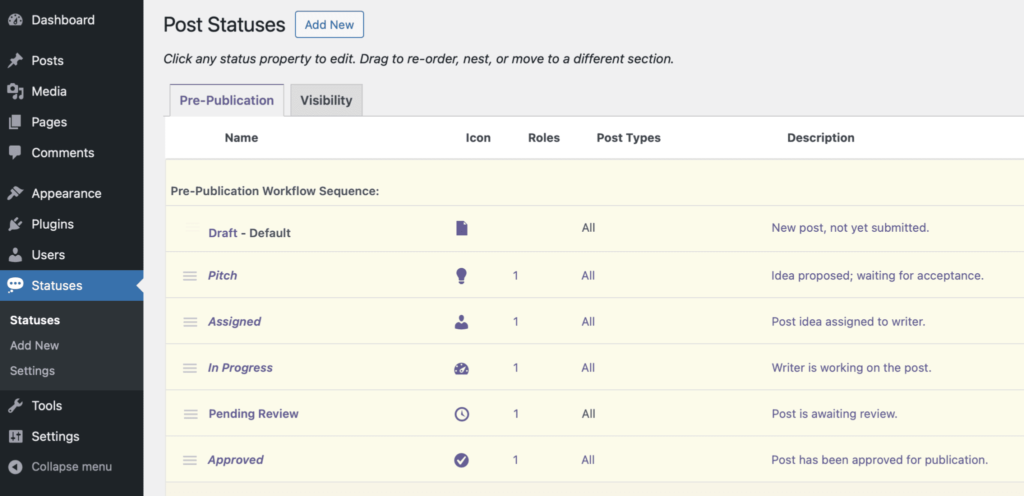
In January, we launched our 10th plugin: PublishPress Statuses.
Have you ever wanted to label a WordPress post something other than “Draft” or “Pending Review”?
PublishPress Statuses allows you to create additional statuses for your posts. For example, you can add statuses such as “In Progress”, “Needs Work”, or “Rejected”.
You can also control which users can move posts to each status. This is really helpful for moderating and proof-reading content before it goes live on your site.
We accomplished this thanks to Kevin, our developer who led this release. In January 2025, we’ll release a Pro version of PublishPress Statuses. This will allow you to have custom statuses for PublishPress Revisions so you can moderate changes to published content.
PublishPress Planner: Content Board
PublishPress Planner is the first plugin we ever released. One of our key goals for this year was to build SaaS-style features in WordPress so you don’t need an extra service to plan your content. Why use Trello, ClickUp, Notion, or other products when you already have WordPress?
The new “Content Board” screen provides a screen that we’ve seen in many SaaS services. You get one column for each status. So you start with columns for “Draft”, “Pending Review”, “Published” and “Scheduled”.
Each post on this screen is referred to as a “card” and has details such as the Post date, Title, Post type, and Author. You can customize the filters and card details that are used on this screen. Here is our guide to custom filters and here is our guide to custom card details.
This screen integrates with PublishPress Statuses so you can see your custom statuses here too.
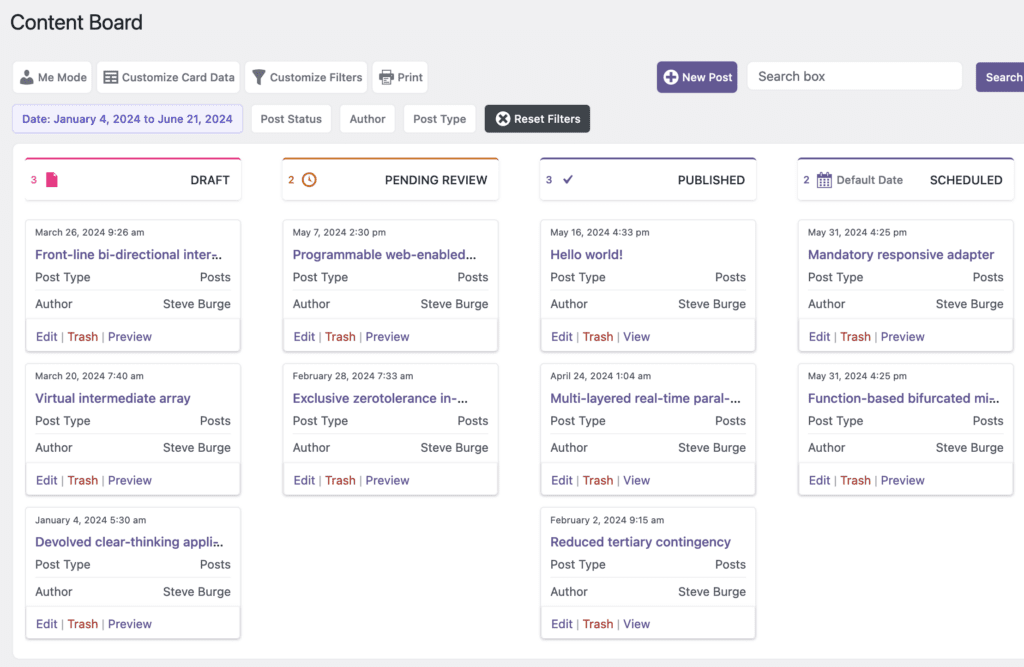
On this screen you can drag-and-drop the posts to change their status. In the image below, we’re moving a post from the “Draft” status to the “Pending Review” status. We give many thanks to Ola on our team for building this feature. Click here for more details on the Content Board.

PublishPress Authors: Categories for Authors
We always listen carefully to your feedback. Sometimes that feedback is so overwhelming that we have to build a new feature. This happened with PublishPress Authors.
The PublishPress Authors plugin allows you to create, manage and display authors for all your WordPress content. Your feedback was that you wanted to have different types of authors.
Imagine having a WordPress post where you give credit to the main Author, an Editor, a Reviewer, and a Photographer. One common use of this feature is adding a “Reviewed by” author to WordPress posts.
That’s now possible with PublishPress Authors. This screenshot shows what’s possible with this feature. We are thankful of our teammate Paul for giving us this feature. Click here for more details on Author Categories.

PublishPress Future: Workflows
The PublishPress Future plugin allows you to schedule changes to posts. Version 4.0 enables you to schedule changes using advanced, drag-and-drop workflows. Here are some examples of what’s possible:
- Change the post status to “Trash” a week after the publication date.
- 15 days after the post is published, move the post to the “Draft” status and add a new category.
- One year after a post is published, send an email to the author asking them to check the content.
- Unpublish posts automatically two months after they were last updated.
We’ve designed the PublishPress Future workflow builder to look just like the block editor in WordPress. Here’s a screenshot of the new builder. Find out more about PublishPress Future 4.0. We owe a thank you to Anderson, who is our CTO, for building this workflow feature.

PublishPress Capabilities: Admin Menus
PublishPress Capabilities is our most popular plugin. In the Pro version of the plugin, you can now rename, redesign and rearrange your WordPress admin menus. You can even add new menu links.
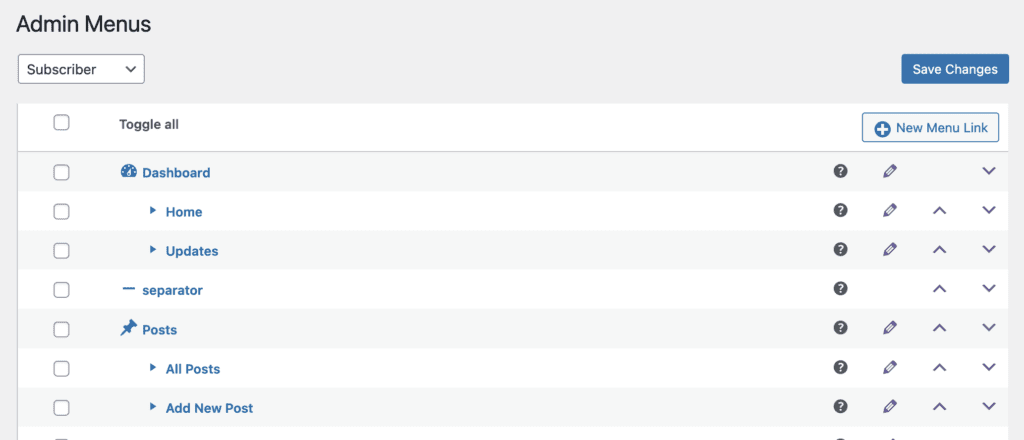
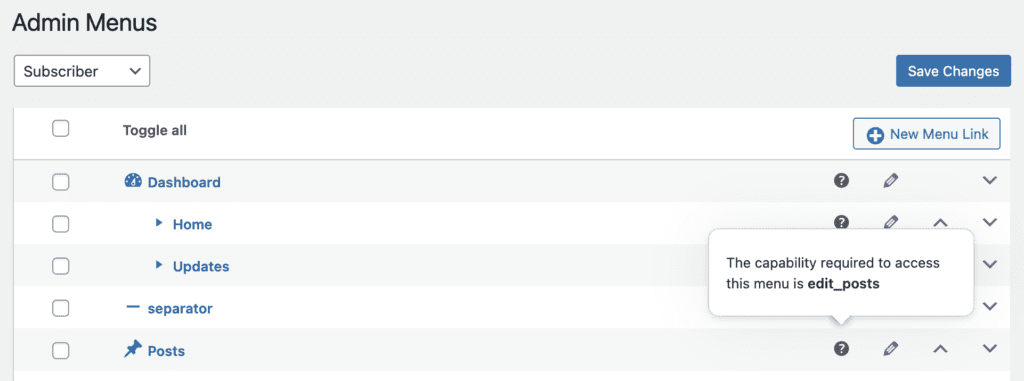
This screen has lots of useful features, including the ability to see which capability is controlling each admin menu link. You can hover over the question mark tooltip to see the details. We give thanks to Ola, our developer who took the lead on this project. Click here for more details on managing your WordPress admin menus.
One Word for 2025: Integrate
In January 2025, we’ll offer ten different Pro plugins, after the launch of PublishPress Statuses Pro. We want to make it easier for people using more than one of those plugins. So our aim is to integrate many of the settings for these plugins, including the license keys. You’ll see a new area that will be shared between all the PublishPress plugins.

Thanks for all the support you’ve shown to PublishPress this year. All the features in this review have been built in response to your feedback.
If you have suggestions for how we can help you in 2025, please let us know. We love to hear your ideas.

Create workflows for your WordPress content
PublishPress Statuses allows you to add custom statuses for your posts. You can use these statuses to create custom publishing workflows.

Approve and schedule changes to your posts
PublishPress Revisions is the ultimate tool for making content changes in WordPress. This plugin offers a safe space for users to work on content updates.

Plan and manage your WordPress content
PublishPress Planner has all the tools you need to plan and schedule WordPress content, including a scheduling calendar, Kanban Board, editorial notifications and more.

Schedule changes to your WordPress content
The PublishPress Future plugin allows you to schedule automatic changes to posts. You can update your content using custom workflows involving multiple steps.

Control your WordPress users
PublishPress Capabilities enables you to customize what users see in every area of WordPress from editing posts and pages to admin menus, profile pages.

The author profile plugin for WordPress
The PublishPress Authors plugin allows you to create beautiful profiles for your site’s authors. You can add social media links, recent posts, custom layouts and much more.
