
Show Scheduled Revisions on the PublishPress Calendar
It's now possible to combine the PublishPress Revisions and PublishPress Planner plugins.
In the Revisions plugin, you can schedule revisions to be automatically published in the future. This allows you to update content now, but publish those changes at a later date.
In the Planner plugin, you can use the Content Calendar screen to see all your planned content.
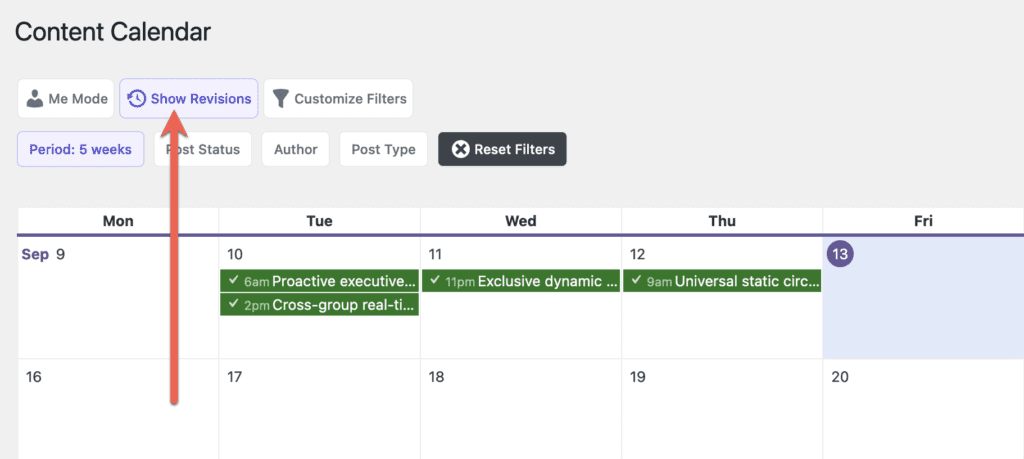
You can now see all your scheduled revisions on the Content Calendar screen. If you're using the Pro version of PublishPress Planner, you'll see the “Show Revisions” button in the screenshot below.
After you click the “Show Revisions” button, you'll be able to see all your scheduled revisions, as in this screenshot below:
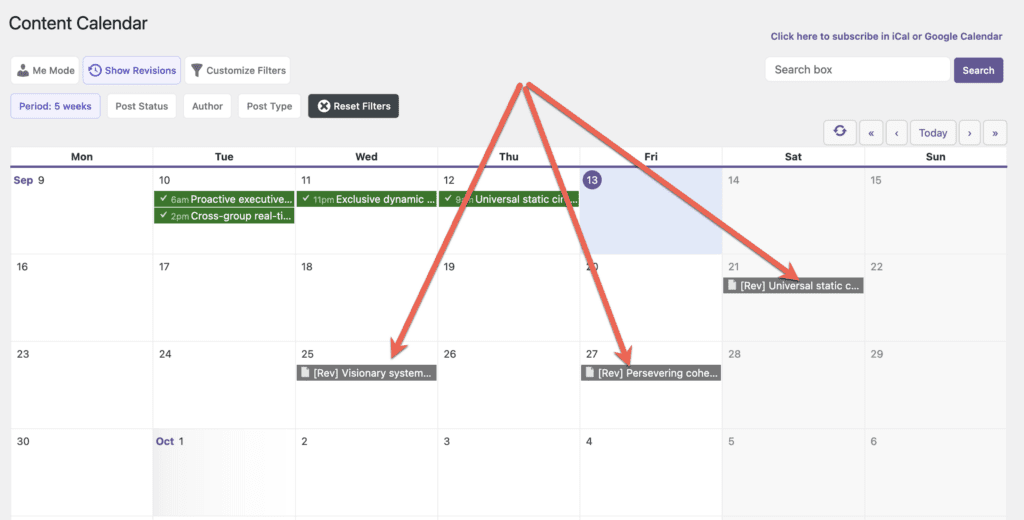
Table of Contents
More About PublishPress Planner
Our goal with PublishPress Planner is to help you replace expensive SaaS services. Why use Trello, ClickUp, Notion, or other products when you already have WordPress?
This year we've already built the Content Calendar, Content Overview, and Content Board. The ability to see upcoming revisions on the Content Calendar is one more step towards that goal. With Planner, you can now write, plan, and publish your content entirely inside WordPress.

The Best Plugin to Approve and Schedule Changes to Your WordPress Posts
PublishPress Revisions is the ultimate tool for making content changes in WordPress. This plugin offers a safe space for users to work on content updates.

The Best Plugin to Plan and Manage Your WordPress content
PublishPress Planner has all the tools you need to plan and schedule WordPress content, including a Content Calendar, Kanban Board, editorial notifications and more.

THANK YOU sooooo much for this… I know I have been asking for this feature for a while and was pleasantly delighted to see it!
That’s good to hear, thanks Marie