
PublishPress Revisions 3.9.1: WooCommerce Support
This post is about a release of the PublishPress Revisions plugin. This plugin allows you safely manage changes to published posts in WordPress. You can approve all changes to posts and even schedule them to go live on a specific day.
PublishPress Revisions v3.9.1 gives editorial teams more control over who can approve revisions and how many revisions can be open for a post. The update adds new workflow settings, clarifies WooCommerce support, and fixes several rough edges in the revision comparison screens.
Table of Contents
WooCommerce Support
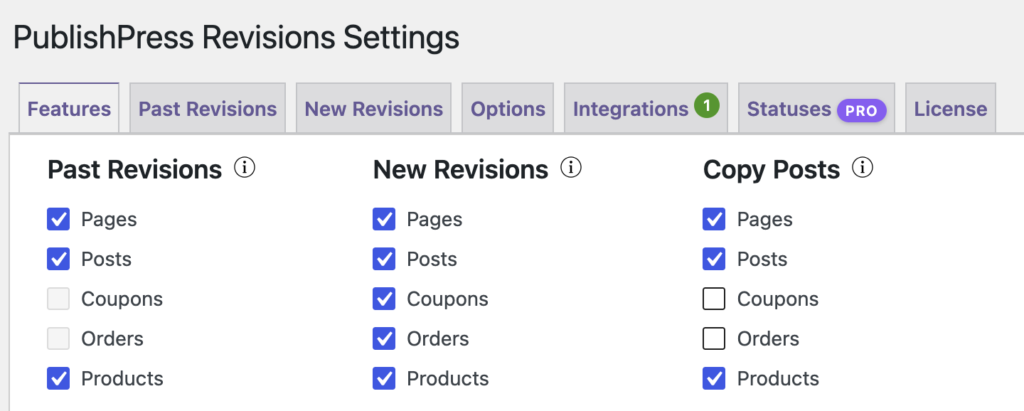
PublishPress Revisions now provides support for WooCommerce. By default, WooCommerce doesn’t have support for any type of revisions feature. Find out more here.
Other changes
The comparison workflow also gets attention in this release, especially for sites where fields could appear blank, unchanged, or noisy in the Compare Revisions screen.
- More reliable comparisons: Blank or unmodified field values on Compare Revisions should display more accurately.
- Fewer PHP warnings: The Compare Revisions screen has fixes for PHP warnings reported in previous versions.
- Simpler WooCommerce fields: Redundant Copy buttons have been removed from WooCommerce fields in the comparison view.
- Cleaner navigation: Paging controls on the New Revisions screen now have improved spacing.
- Activity list fix: Disabling the option to list unsubmitted revisions for My Activity or revisions to your posts now works as expected.
- Stricter approval control: A new setting lets you require the Approve Revision capability before users can approve changes.
- More flexible revision limits: Sites using the one revision per post limit can now choose to ignore unsubmitted revisions.
- Quieter revision indicators: The Revisions menu count is now disabled by default, and unsubmitted revisions no longer show a front end indicator.
- Sidebar polish: Revision buttons in the Revision Editor sidebar have updated styling.
This post provides an overview of the new features in this release of the PublishPress Revisions plugin. The complete changelogs for both Free and Pro versions are available in our Docs area.

Approve and schedule changes to your posts
PublishPress Revisions is the ultimate tool for making content changes in WordPress. This plugin offers a safe space for users to work on content updates.
