
How to Use WordPress User Roles at Your Web Agency
Every user account on a WordPress website is assigned to one of five roles. These WordPress user roles control access to the site backend, the ability to modify your user profile, and access to all the features of WordPress such as creating content and using plugins.
In this post, we’ll explore how agencies can use WordPress user roles internally to provide their staff a customized experience to focus their efforts and improve productivity.
Table of Contents
What are WordPress user roles?
User roles are part of the roles and capabilities system in WordPress. By default, WordPress includes the following user roles:
When a user logs into a WordPress website, the roles and capabilities system controls what parts of the site a user can access, and what actions they are allowed to take. For example, administrators can install and update plugins and themes, while editors can not.
Similarly, editors can edit their own posts as well as posts created by other users. But authors can only edit their own posts.
Plugins like WooCommerce add additional user roles (shop manager and customer) that govern order management.
How agencies can benefit from user roles
WordPress agencies will often use these user roles to customize the experience for their clients and to restrict access to areas of the site that are sensitive.
For example, preventing client access to the plugin installer can help prevent novice WordPress users from adding or removing plugins unexpectedly and breaking a site.
Internally, agencies can also leverage WordPress user roles to improve productivity and maintain site integrity. Here are some ideas you can use at your agency.
Modifying the admin layout using WordPress user roles
One way to customize the admin interface is to display widgets based on roles.
For example, you might want to disable the default admin widgets for your content and marketing staff and replace them with something else. In the example below, we’ve replaced the default widgets with a custom widget containing a tutorial about how to edit site content.
Additionally, some Google Analytics data is shown as this is relevant for marketing staff.
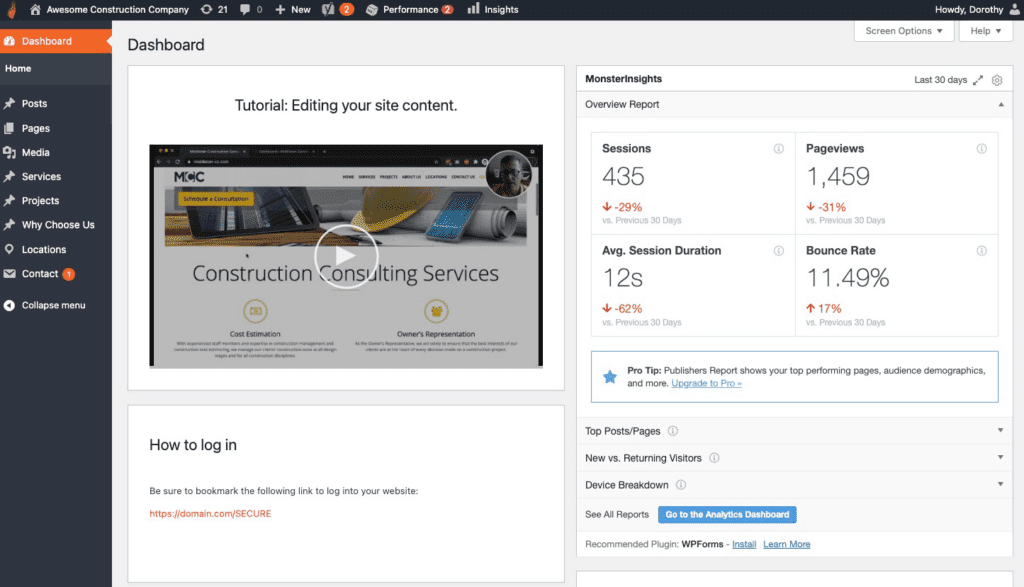
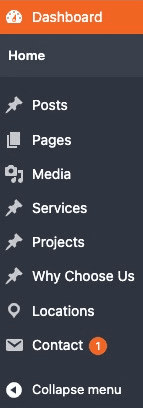
Similarly, you may want to customize the menu items displayed to content creators and marketers. Continuing the example above, many of the default menu items in the WordPress admin are not relevant for authors such as pending plugin updates.
It’s clear that a curated menu helps authors focus on the job and not be distracted or confused by a large, complicated menu.
Role-specific permissions and access
In addition to modifying the admin layout, agencies can also use WordPress user roles to specifically allow or disallow access to specific areas of the admin. This prevents accidental access and typically improves the reliability of the website.
Here are some examples of tasks or features that you may want to restrict to specific user roles.
- Allow authors to submit content as drafts, but not to publish that content. This allows you to implement a simple editorial workflow which is common for busy sites.
- Restrict access to the
pluginsarea so that only engineers and developers can install and manage plugins. - Restrict access to the
appearancearea so that only designers and developers can modify themes and customize the look and feel of the website. - Allow access to SEO plugins only to marketing staff.
- Restrict access to the
usersarea to your human resources staff. - Allow your designer to access the
media libraryso they can upload assets. - For your E-commerce shop, restrict the fulfillment and shipping staff to the
ordersarea of WooCommerce so they can update the order status as items are sent out. - Create a custom post type for creating landing pages, and restrict access to your marketing department.
Plugins to view and modify WordPress roles and capabilities
For sites with large teams, it may be helpful to create custom rules in addition to the defaults provided by WordPress. For example, you might create copywriter and shop manager roles, and then assign specific capabilities to these roles.
To manage custom roles and capabilities, we recommend PublishPress Capabilities.

Control your WordPress users
PublishPress Capabilities enables you to customize what users see in every area of WordPress from editing posts and pages to admin menus, profile pages.
