
PublishPress Authors 4.18: Accessibility Upgrades, Avatar Alt Text, and API Support
This post is about a release of PublishPress Authors. This plugin allows you to create beautiful profiles for your site’s authors. You can add social media links, recent posts, custom layouts, and much more.
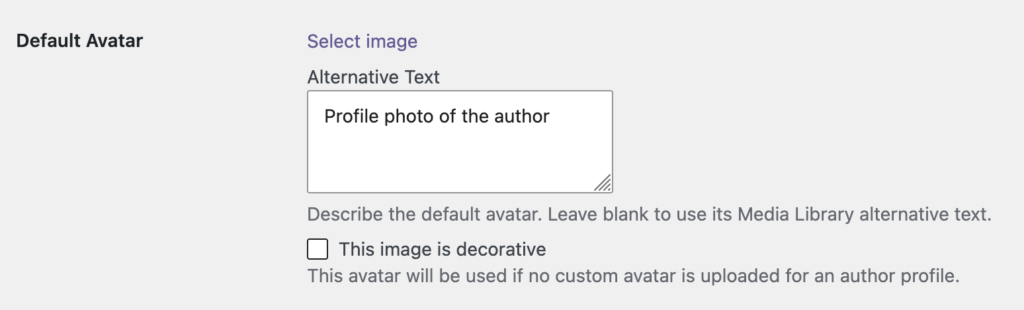
PublishPress Authors v4.18.0 is an accessibility-focused release with a useful new control for author images: custom alternative text and decorative-image settings for avatars. Author pages, boxes, lists, forms, and search tools should now be easier to use with screen readers and keyboards, while site owners get more control over how author images are described.
Table of Contents
Feature highlights
The new avatar accessibility options help you decide whether an author image should be described to visitors or treated as visual decoration. Use custom alternative text when an avatar adds useful context, or mark it as decorative when assistive technology should skip it.
- Custom avatar alternative text — Author avatars can now use custom alt text or be marked as decorative images when appropriate.
- Better labels across author tools — Author forms, post editor selectors, category controls, search fields, profile links, and settings now have clearer accessible names.
- Improved keyboard access — Author removal, shortcode, reorder, Author Index, and author-control interactions are easier to reach and use without a mouse.
- Clearer screen-reader feedback — Admin validation errors, save errors, copy confirmations, migration progress, author-sync logs, and filtered index results are announced more reliably.
- More accessible image output — Featured images, recent post image links, the admin footer logo, and fallback author avatar text now provide better context for assistive technology.
Other improvements and fixes
This release also fixes a wide range of issues that affected author display, editing, shortcodes, and compatibility with other WordPress setups.
- More accurate theme bylines — Themes that call WordPress author metadata should now show the selected PublishPress author instead of a fallback user.
- Author Box reliability — Fixes address checkbox save conflicts, upgraded layouts showing only the first biography, and missing custom author box views.
- Shortcode fixes — The Author List shortcode now respects
show_titlewhen usinglist_id, and Authors Data shortcode formatting is more consistent. - Profile and bio fixes — Author bios should no longer lose
<p>tags or revert to older content after linked WordPress users are updated. - Administrator profile editing — Administrators can now edit author profiles linked to administrator accounts.
- Compatibility updates — Fixes include multisite blog name lookups, an Ultimate Member metabox conflict, stale block editor author selections, and invalid workflow author assignments.
- Admin hardening — Author names, edit links, and quick-edit data are now escaped in the admin Authors list.
Developer improvements
- WordPress Abilities API support — Author profiles, profile fields, and post authors now expose read-only abilities for integrations that use the Abilities API.
- Fewer database queries on save — Author-category relationship inserts are batched into one prepared multi-row query instead of running inside nested loops.
- Safer transient cleanup — The rewrite rule flush transient now expires after a week if it is not consumed and deleted on the next admin load.
This post provides an overview of the new features in this release of the PublishPress Authors plugin. The complete changelogs for both Free and Pro versions are available in our Docs area.

The author profile plugin for WordPress
The PublishPress Authors plugin allows you to create beautiful profiles for your site’s authors. You can add social media links, recent posts, custom layouts and much more.
