
Which WordPress Users Can Delete Files From the Media Library?
You won't be surprised to learn that WordPress is very, very careful about who can delete media files.
Only Administrators are able to delete images and files in your Media Library.
Anyone who is a Subscriber, Contributor, Author and Editor roles is not permitted to delete media items.
If you want to change who is allowed to delete files, I recommend that you install the PublishPress Capabilities plugin.
- Go to “Capabilities” in your WordPress admin area.
- In the top-left corner of the screen, load the user role that you want to customize. In this image below, I've chosen the “Editor” role:

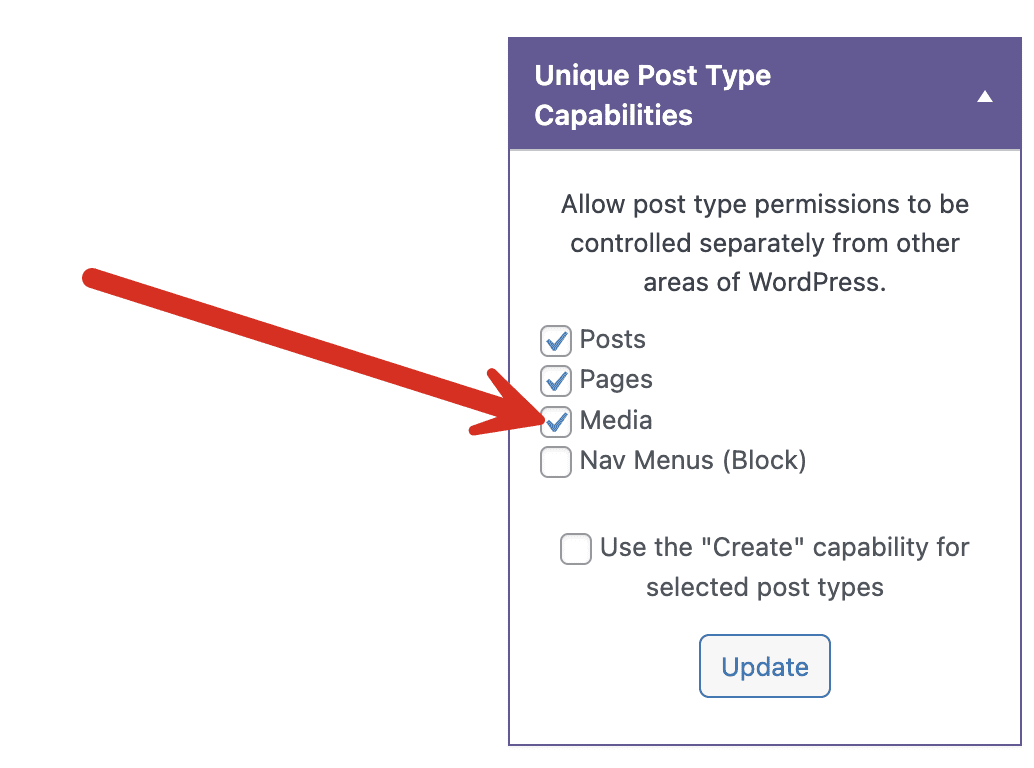
- In the right sidebar, check the “Media” box under “Type-Specific Capabilities”. Doing this will allow you more control over permissions for the Media Library.
You can now set the delete permissions. Click the “Deletion” tab. If you want to allow people in the Editor role to delete anything in your Media Library, check all the boxes in the “Media” row.

- Click “Save Changes” at the bottom of the screen.
It's as simple as that. Now whenever a user in the “Editor” role goes to the Media Library, they'll see a “Delete permanently” link for any file they see:


The Best Plugin to Control Your WordPress Users
PublishPress Capabilities enables you to customize what users see in every area of WordPress from editing posts and pages to admin menus, profile pages.

Hi. I have installed pure wordpress 5.9.1 and unfortunately by default there is no protection against deleting files, no matter if I am an administrator or not, I can delete all files. So does the free version of the plugin have any impact on the media folder?
Hi Thomas. Our plugin can protect the media folder if you enable those features.
There does not appear to be any option for media deletion capabilities anymore, at least for my install. There is a separate tab now for Media, there is only a capability listed for edit_files, upload_files, and unfiltered_upload. Version 2.19.1
Hi Brennan. I’ve updated the screenshots in the post but they haven’t changed much. Don’t look under the “Media” tab. Look under the “Deletion” tab.
Hi
I need to get some advice on your products.
I need to be able to allow users to login to my e commerce site and add products and media under certain categories.
However i need the ability to stop them from seeing other user content and edit or delete, and i am unsure what product will allow me to do this.
I suppose i wanted to make my site multi vendor.
So to summarise, a user can log in, upload their image, add a the product and save, log out and there you have it, thier product on the website.
Hi Vince. There’s a lot going on in that question and a lot that’s unclear. For example, what eCommerce platform are you using? I’d recommend sending a question to our Pre-Sales support.