
PublishPress Taxonomies 4.0.1: Improved AI Terms and a New Term Import / Export Tool
This post is about a release of PublishPress Taxonomies. This plugin helps you organize your WordPress content. You get a complete set of management tools for your taxonomies and terms.
This update improves the AI powered Auto Terms workflow, and add a new Import / Export feature for terms on your site.
Table of Contents
Auto Terms improvements
- More flexible AI providers: Auto Terms can now work with the “AI Connectors” feature in WordPress. This gives you access to OpenAI, Claude, Gemini and other services.
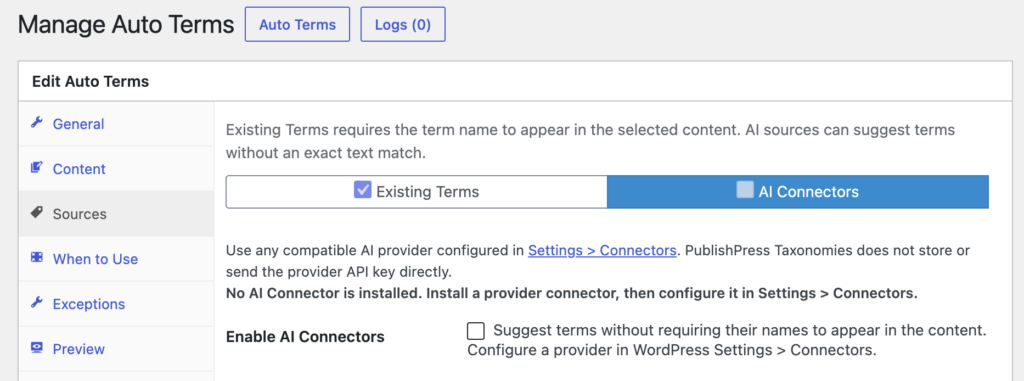
- More focused AI term suggestions: You can limit AI suggestions to selected terms in a taxonomy, making Auto Terms more useful on sites with large vocabularies.
- Pro multi taxonomy generation: Pro users can generate AI term suggestions across multiple taxonomies in one workflow.
- Better Auto Terms previews: Preview results are more consistent, easier to review, and include troubleshooting details to help you understand why terms were suggested.
- Keyword based exclusions: Auto Terms exclusions can now use keywords, so you have more precise control over content that should not receive automatic terms.
- Leaner AI previews: Auto Terms previews now send less post content to the AI service, which helps keep previews focused.
Term display and linking improvements
- Auto Links in more content: Auto Links can now work with excerpts and custom fields, helping you connect more of your site content to relevant term pages.
- Current post terms placement: You can choose above or below placement for current post terms, making it easier to fit term lists into your theme layout.
- Cleaner display settings: Terms Display and format help have been reorganized into clearer settings areas, so related options are easier to find.
- Minimum term usage controls: Term displays can be filtered by usage, helping you avoid showing rarely used terms where they are not helpful.
Better Manage Terms tools
- Easier importing and exporting: Tags Import and Export is now available in Manage Terms. Manage Terms. This feature allows you to import and export terms easily.
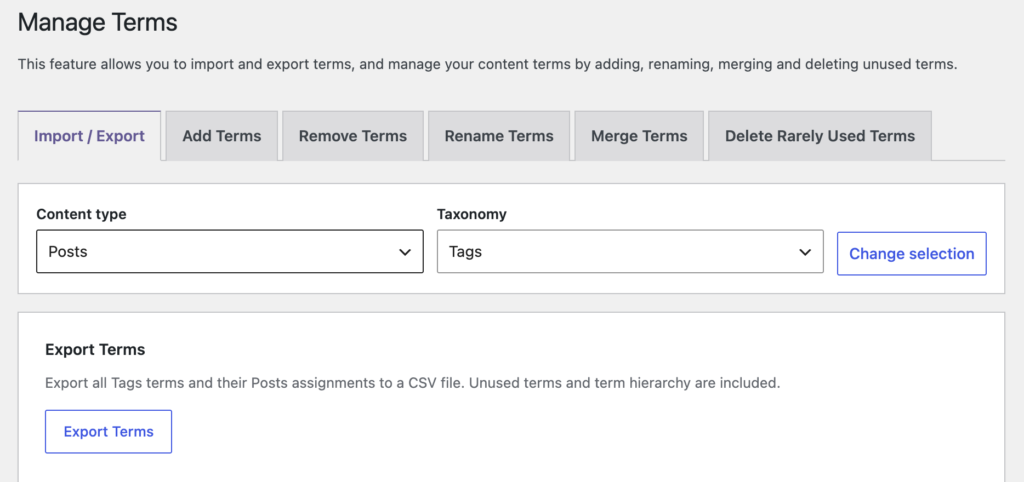
- Safer term merging: The merge tool now requires existing terms for both the source and destination, reducing the risk of accidental new terms or mistaken merges.
- Clearer term ordering labels: Ordering options use clearer wording, so it is easier to understand how terms will be sorted.
- More cautious destructive actions: The Manage Terms screen now adds more safety around actions that can change or remove terms.
Other fixes and refinements
- Related Posts fix: Related Posts no longer risk repeated rendering when blank excerpts are involved.
- Hidden term URL handling: Canonical URLs are preserved for hidden terms, which helps avoid unexpected URL behavior.
- Accessibility improvements: Plugin images and form fields received better labels and text alternatives.
- Security hardening: Several behind the scenes checks were tightened to make admin actions and content handling safer.
- Plugin housekeeping: Promotional links, support links, readme formatting, and upgrade links were refreshed.
If you use Auto Terms, Auto Links, Related Posts, or the Manage Terms tools, this is a worthwhile update because it improves both control and safety without changing the basics of how you work.
This post provides an overview of the new features in this release of the PublishPress Taxonomies plugin. The complete changelogs for both Free and Pro versions are available in our Docs area.

Organize your WordPress content
PublishPress Taxonomies allows you to create and manage Tags, Categories, and all your WordPress taxonomy terms.
