
The Auto Terms Feature Has Huge Improvements in PublishPress Taxonomies
PublishPress Taxonomies 3.3 is available and it has significant upgrades to the “Auto Terms” feature.
Auto Terms is now more powerful, and easier to use.
What does Auto Terms do? It scans your posts and automatically assigns terms. This makes it much easier for you to add useful Tags, Categories, and other taxonomies to your content.
For example, let’s say you have a term called “WordPress”. Auto Terms can analyze your posts, and when it finds the word “WordPress”, it can add that term to your post.
This works for posts, pages and other content types too. Wouldn’t it be helpful to have PublishPress Taxonomies scan your WooCommerce site and add relevant Products Tags and Categories?
This image below shows how the Auto Terms feature works. The post includes “WordPress” and “CMS”, which are also terms on this site. PublishPress Taxonomies has scanned the content, recognized those words, and then automatically added the terms to the post.

Let’s take a closer look at what’s new in this version of PublishPress Taxonomies.
Table of Contents
A New Menu Link and Design
You’ll find “Auto Terms” under a new menu link in PublishPress Taxonomies. In previous releases, this feature had been hidden away in “Settings”.
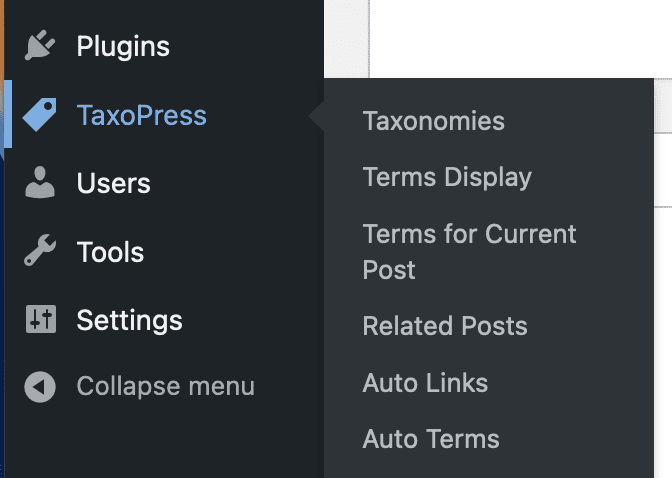
You’ll also see a new and improved design for the Auto Terms screen. This is significantly easier to use than the Auto Terms screen in prior versions.

New Option: Stop Words
The new “Stop Words” option allows you to choose words to exclude from Auto Terms. Any terms entered in this box will not be added to posts, even if those words and phrases are found in your posts.

Add Terms to Existing Content
PublishPress Taxonomies can add Auto Terms to existing content. In PublishPress Taxonomies 3.3, this option works much more effectively. This allows you to automatically add terms to content that may not have any current terms.
- Go to PublishPress Taxonomies > Auto Terms.
- Either edit an existing setup or create a new Auto Terms setup.
- Choose the options you need and click “Save Auto Terms”.
- Click “Add Auto Terms to all existing content”.

- You will now see a progress bar showing the terms being added.
- If you realize you made a mistake adding any terms, you can use other PublishPress Taxonomies features such as Remove Terms or Delete Terms, to clean up those unwanted terms.


Organize your WordPress content
PublishPress Taxonomies allows you to create and manage Tags, Categories, and all your WordPress taxonomy terms.
