
PublishPress Authors Adds “Guest Author” User Role
In the latest version of the PublishPress Authors plugin, we've added a few that improves compatibility with other themes and plugins.
Previously, PublishPress Authors allowed you to add “Guest Authors” that did not have a user account. This option was lightweight but did cause compatibility issues.
To solve this problem, we've added a new option called “Guest Author With User Account”. In this option, PublishPress Authors will create a “Guest Author” user role. Anyone in this role will not be able to login to your site, or edit their profile.
Table of Contents
Video Guide to Guest Authors
How to Use Guest Authors
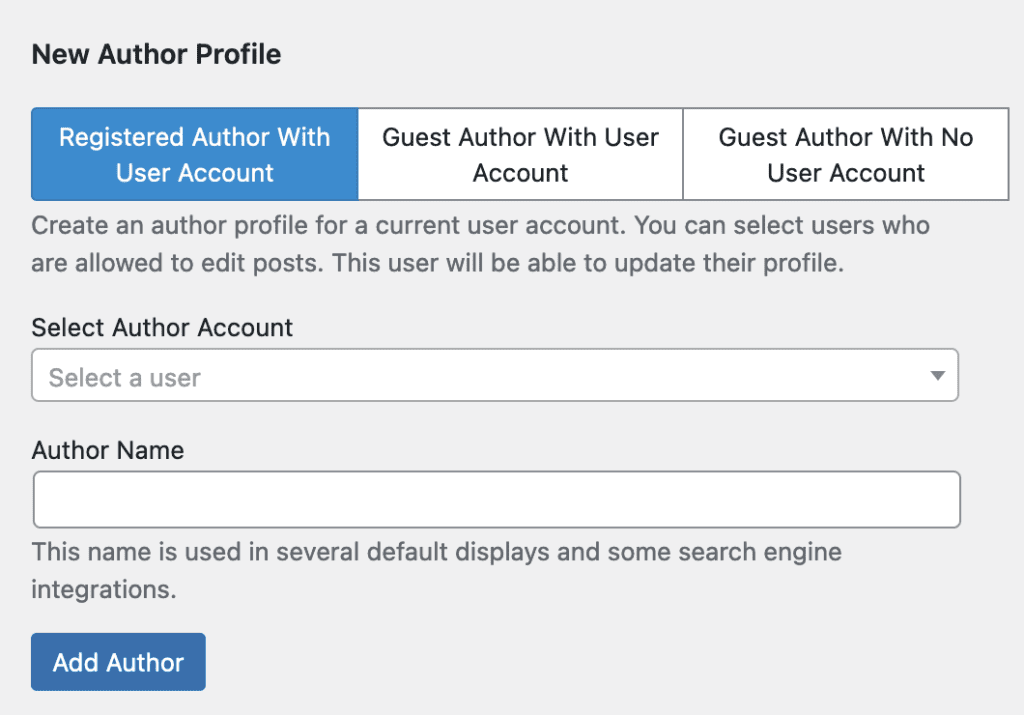
You can now create three kinds of Authors. Here's an overview of the three choices:
- Registered Author With User Account: This is an author profile for a current user account. You can select users who are allowed to edit posts. This user will be able to update their profile.
- Guest Author With User Account: This is an author profile and a linked user account. This account will be in the “Guest Author” role and will not be able to login to the WordPress dashboard or update their profile. This option is best for compatibility with other themes and plugins.
- Guest Author With No User Account: This is an author profile with no linked user account.
This screenshot shows how the author options appear when you create a new author profile.

The Best Author Profile Plugin for WordPress
The PublishPress Authors plugin allows you to create beautiful profiles for your site's authors. You can add social media links, recent posts, custom layouts and much more.

Hi Steve. With this new “Guest Author with User Account” option, will WordPress be able to show BOTH (all) authors on the default “by” line? Or does it only display the first listed author (with user account) in that default WP “by” line?
Also, is there a way to convert an existing Guest Author (With No User Account) into the new Guest Author WITH User Account?
Nice update. Thanks for the creative solution.
Thanks for the kind words, Bruce. This won’t impact how the core works as the basic code snippet still supports only one author.
Yes, you can convert users from the “Authors” admin screen. Use the “Bulk actions” dropdown.