
PublishPress Planner v4.8.0: Expanded Translation Support
PublishPress Planner 4.8.0 improves the experience for editorial teams working across languages. This update expands translation support. PublishPress Planner is now translated into well over 30 languages.
Table of Contents
Feature highlights
- Expanded language support: The translation system now supports up to 34 languages, helping more teams use Planner Pro in the language that fits their workflow.
- Better translation tooling: New configuration for Loco Translate support in the Pro version should make ongoing translation work easier to manage. Here’s a screenshot of Planner translated into Japanese:
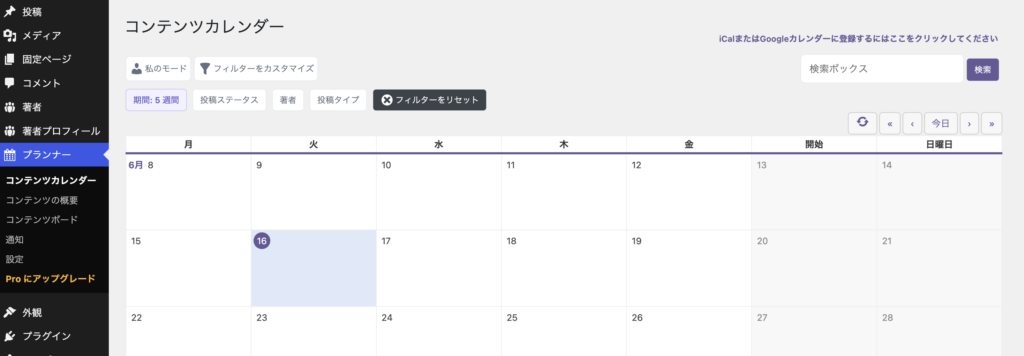
For most site owners, the language improvements should fit into the normal WordPress translation workflow. If your site uses translated WordPress admin screens or custom translation tools, this release should make Planner Pro easier to maintain over time.
Other changes
- Permission fix: The “Save Changes” button is no longer shown in Content Calendar, Content Overview, and Content Board modals to users who do not have edit permissions.
- Security and compatibility maintenance: Several frontend libraries, including lodash, minimatch, picomatch, webpack, js-yaml, diff, and brace-expansion, were updated.
Developer improvements
This release also cleans up project maintenance workflows for teams contributing to or building the plugin.
- Composer scripts: Build scripts were refactored to make the development process clearer and easier to maintain.
- CI and code checks: Workflow updates improve branch handling, environment setup, and automated checking reliability.
- Workspace consistency: Development environment changes help keep contributor setups more consistent.

Plan and manage your WordPress content
PublishPress Planner has all the tools you need to plan and schedule WordPress content, including a scheduling calendar, Kanban Board, editorial notifications and more.
