
PublishPress Permissions v4.8.2: Clearer Group Permissions and Term Controls
This post is about a release of PublishPress Permissions. This plugin to allows you to control who can view and edit your WordPress content. You can give very specific access to individual posts, tags, categories, and more.
PublishPress Permissions v4.8.2 makes it easier to understand where a user’s permissions come from. Site managers can now see permissions inherited from Permission Groups on individual user screens, which should make troubleshooting access much faster on sites with complex editorial or membership workflows.
Table of Contents
Feature highlights
- Inherited user permissions: You can now display all permissions an individual user receives from Permission Groups, helping you confirm why someone can or cannot access specific content. This screenshot shows an example of those details. You’ll find them inside each user’s profile.
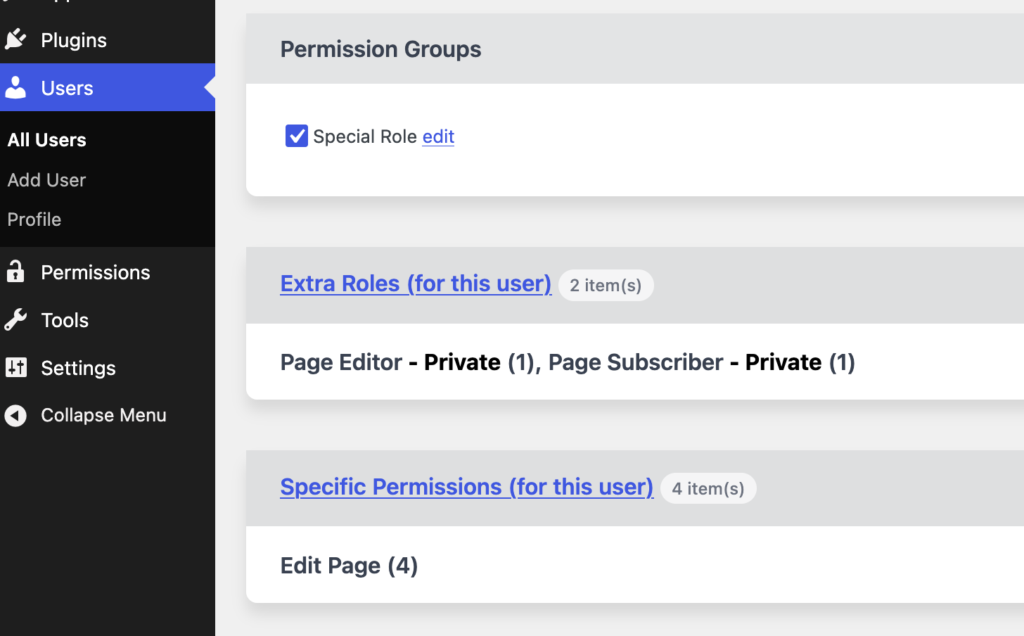
- Clearer group context: The Group Permissions list now shows the group name attached to each permission, reducing guesswork when reviewing access rules.
- More precise permission management: Separate capabilities are now available for managing term permissions and edit permissions, giving administrators finer control over who can adjust those settings.
- Teaser access support: New fallback capability handling for
pp_manage_teaserhelps keep teaser management permissions working more consistently.
In practice, this update should be especially useful for teams that manage permissions through groups rather than only through individual users. When reviewing a user’s access, you can now see inherited permissions more directly and trace them back to the relevant group.
Other improvements and fixes
- Term and taxonomy restrictions: Fixes improve Assign Terms, Manage Term, Set Parent, and taxonomy parent restrictions in several edge cases.
- Permissions screen reliability: Users who are allowed by configuration can now access the Permissions editing screen, and the “None” option appears correctly when no items are published.
- Cleaner admin screens: Tooltips, capability descriptions, translations, teaser columns, and metabox spacing have been refined for a clearer editing experience.
- Stability fixes: The update resolves a null post type warning in
TeaserHooks.phpand prevents possible infinite ancestor count loops for taxonomy terms. - Capability cleanup: Unused and inactive capabilities have been removed from the Capabilities UI, and default handling for
pp_manage_settingshas been corrected.
For developers
- Capability mapping: The
map_meta_capfiltering logic now supports alternate pseudo IDs for more flexible permission handling. - Capability structure: This release adds fallback support for
pp_manage_teaserand separates capabilities for term permission management and edit permission management. - Removed capability references: The unused
pp_assign_rolescapability and inactivepp_set_read_exceptionsandpp_set_edit_exceptionsUI entries have been removed.
This post provides an overview of the new features in this release of the PublishPress Permissions plugin. The complete changelogs for both Free and Pro versions are available in our Docs area.

Control access to your content
PublishPress Permissions allows you to enable or deny access to posts, pages, categories, tags and more. You can control who can view and edit your WordPress content.
