
How to Set Default Access in PublishPress Permissions
Earlier this week, we had a question from a PublishPress user. They are using PublishPress Permissions to control access to specific posts and pages.
In the image below, you can see the metabox from the PublishPress Permissions plugin. For each role, you can choose whether or not they can edit this page. The Author and Contributor roles are set to “No”. The Administrator and Editor roles are set to “Yes”.

The PublishPress user wanted to know if it’s possible to change the defaults in this metabox. For example, is it possible to change the default to “Yes” for Authors? Yes, this is possible and we’ll show you how it’s done in this tutorial.
Table of Contents
Change the defaults to “Yes”
The PublishPress Permission metaboxes are controlled by the capabilities for WordPress roles. So if you update the capabilities for the Author role, those will be reflected in PublishPress Permissions.
We’re going to use the PublishPress Capabilities plugin for these changes, so please make sure you have that plugin installed along with PublishPress Permissions.
- Go to “Capabilities” in your WordPress admin menu.
- Select “Author” in the top-left corner.
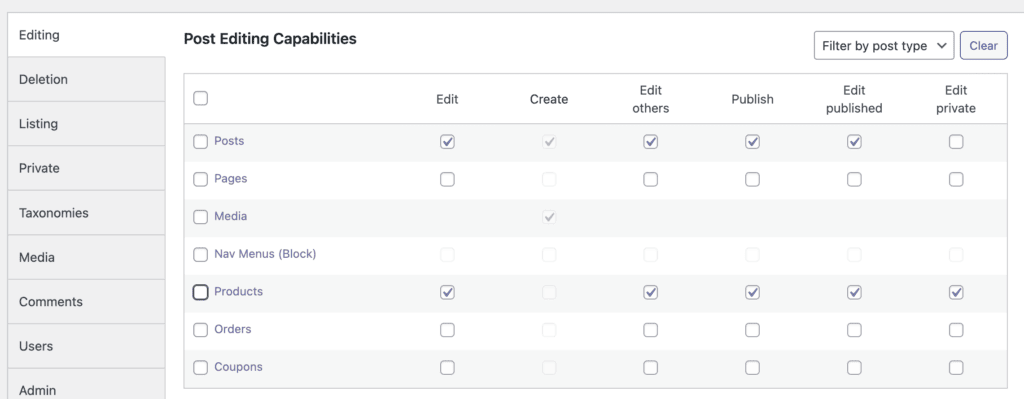
- Check the box for “Edit Others” in the “Posts” row.
- Click “Save Capabilities”.

Now when you go to edit a new post, you will see that the default for posts is “Yes”. In this example, we changed the edit_others_posts capability in the WordPress core.

Change the defaults to “No”
It’s also possible to reverse the process and change the default to “No” for each post. In the images above, you can see that the Editor role is set to “Yes”. By default, users in the Editor role can always edit new posts.
- Go to “Capabilities” in your WordPress admin menu.
- Select “Editor” in the top-left corner.
- Uncheck the box for “Edit Others” in the “Posts” row. You may also want to uncheck the box for “Edit Published” to prevent Editors from making changes to published posts.
- Click “Save Capabilities”.

- Now when you go to edit a post, the Editor role will be blocked by default, as in this image below:

Permissions for WooCommerce and other post types
PublishPress Permissions works with any post type, so you can use this technique with any post type. In the image below, you can see also see post types from WooCommerce. Using these checkboxes, you can change the defaults for any post type.
Control access to your content
PublishPress Permissions allows you to enable or deny access to posts, pages, categories, tags and more. You can control who can view and edit your WordPress content.

Control your WordPress users
PublishPress Capabilities enables you to customize what users see in every area of WordPress from editing posts and pages to admin menus, profile pages.
