
PublishPress Cart 1.2: AI and Elementor Integration
This post is about a release of PublishPress Cart. This plugin lets you create checkout pages and accept payments for courses, downloads, memberships, and services.
PublishPress Cart 1.2.0 is a feature-rich update focused on making stores easier to build, promote, and manage. You now have more ways to place Cart layouts on your site, a dedicated place for global coupons, optional Meta Pixel tracking, and new purchase automation for sites that use PublishPress Permissions.
Table of Contents
Use your AI tools with Cart
This version of PublishPress Cart adds native MCP integration for compatible AI tools. You can use your favorite AI tool to create and manage the links on your site. HJere
| Ability | What it does |
|---|---|
list-features | Lists Cart’s feature areas, the read/write actions in each, and the capabilities they need |
get-settings | Reads store currency, company, account page and email settings, with the current revision |
update-settings | Changes store settings and transactional emails; settings you leave out stay as they are. dry_run previews |
get-service-setup | Gives the WordPress settings screens where you enter gateway credentials and connect integrations. Never handles credentials itself |
get-checkout-experience | Reads which Stripe checkout is in use: classic, element or hosted |
set-checkout-experience | Switches the Stripe checkout type. Hosted checkout doesn’t support order bumps or upsells |
list-records | Finds products, orders and subscriptions by kind and title |
get-record | Reads one product, order or subscription. Orders include payment status, totals and customer name/email |
create-record | Creates a product draft or other catalog item |
update-record | Changes a catalog item’s title, content, excerpt, slug, featured image or status |
get-catalog-lifecycle | Reads the revision needed before duplicating, trashing, restoring or deleting a catalog item |
update-catalog-lifecycle | Duplicates, trashes, restores or permanently deletes a catalog item (not orders or subscriptions) |
get-product-settings | Reads a product’s settings, field types, choices and revision |
update-product-settings | Changes a product’s appearance, availability, stock, sale and confirmation settings |
get-payment-plans | Reads a product’s payment plans |
set-payment-plans | Replaces a product’s payment plans (one-time, recurring, pay-what-you-want, free) and syncs them to Stripe |
get-product-files | Reads a product’s secure download files |
set-product-files | Replaces a product’s download files |
upload-product-file | Uploads a secure file of up to 2 MiB, sent as base64 with a checksum |
get-product-notifications | Reads a product’s purchase notification emails |
set-product-notifications | Replaces a product’s purchase notifications. Never sends mail immediately |
get-product-integrations | Reads a product’s integration rules, available services and field mappings |
set-product-integrations | Replaces a product’s integration rules. Needs manage_options |
list-product-terms | Lists product categories or tags |
create-product-term | Creates a product category or tag |
update-product-term | Updates a product category or tag |
get-product-terms | Reads a product’s category or tag assignments |
set-product-terms | Replaces a product’s category or tag assignments |
get-product-term-deletion | Shows which products and child terms a deletion would affect |
delete-product-term | Deletes a product category or tag |
get-order-details | Reads an order’s contact, address, account and status fields |
update-order-details | Changes an order’s contact, address, account and status fields (Stripe status can’t be changed) |
create-manual-order | Records an offline or cash-on-delivery order. Doesn’t charge any payment |
resend-order-confirmation | Resends a paid order’s confirmation email |
refund-order | Refunds all or part of an order through the payment gateway |
cancel-subscription | Cancels a subscription immediately or at the end of the period. Doesn’t refund |
pause-subscription | Pauses an active, trialing or past-due subscription |
resume-subscription | Resumes a paused subscription |
get-payment-operation | Shows payments or refunds whose outcome is unknown |
resolve-payment-operation | Settles an unknown payment or refund once its real outcome is confirmed. Can’t retry a charge |
get-stripe-sync-scope | Shows what a Stripe sync would change locally |
sync-stripe-record | Refreshes a stored order or subscription from Stripe |
get-order-downloads | Reads an order’s download access (no customer keys or links) |
update-order-download | Changes how many downloads are left or when access expires |
revoke-order-download | Removes download access from an order |
get-monthly-overview | Reads this month’s dashboard numbers: orders, subscriptions and plans |
export-records-csv | Exports orders, subscriptions or contacts as CSV, up to 100 rows per page |
send-test-email | Sends a test of a transactional email template, using made-up customer data |
And there are abilities that can be used only with Cart Pro:
| Ability | What it does |
|---|---|
get-webhook-subscriptions | Reads site-wide and Zapier webhook subscriptions (endpoint URLs stay hidden) |
save-webhook-subscription | Creates or updates a webhook. Needs an explicit list of fields to send and a public HTTPS endpoint |
delete-webhook-subscription | Deletes a webhook subscription |
list-affiliates | Lists affiliate profiles |
get-affiliate | Reads one affiliate’s profile, product assignments and exclusions |
create-affiliate | Creates an affiliate. With user_id=0 it isn’t linked to a WordPress account, and it never creates one |
update-affiliate | Updates an affiliate’s profile and product lists |
delete-affiliate | Deletes an affiliate but keeps their purchase and payout records |
get-affiliate-commissions | Reads a product’s affiliate commission rules |
set-affiliate-commissions | Replaces a product’s affiliate commission rules |
list-affiliate-payments | Lists an affiliate’s commissions and payouts |
get-affiliate-payment | Reads one commission or payout |
update-affiliate-payment | Marks a commission or payout (paid, pending, refunded, etc.). Record-keeping only; no money moves |
get-affiliate-statistics | Reads an affiliate’s earnings, visits and conversions, optionally over a number of days |
list-affiliate-visits | Lists an affiliate’s visits, without IPs, URLs or referrers |
get-affiliate-product-statistics | Reads sales, visits and earnings per product for an affiliate |
get-extensions | Reads whether the Affiliate, Mollie, Razorpay and Square extensions are on |
set-extension | Turns one of those extensions on or off. Turning off a gateway doesn’t cancel existing subscriptions |
list-tax-rates | Lists custom tax rates |
save-tax-rate | Creates or updates a tax rate (0–100, with a priority) |
delete-tax-rate | Deletes a tax rate |
export-pro-csv | Exports tax rates or coupons as CSV |
import-pro-csv | Imports tax rates or coupons from CSV. Checks every row first and keeps existing rows |
get-checkout-fields | Reads a product’s default and address checkout fields |
set-checkout-fields | Updates only the checkout fields and properties you send |
get-coupons | Reads a product’s coupons |
set-coupons | Replaces a product’s coupons and syncs them to the gateway |
get-custom-fields | Reads a product’s custom checkout fields |
set-custom-fields | Replaces a product’s custom checkout fields |
get-order-bumps | Reads a product’s extra order bumps |
set-order-bumps | Replaces a product’s extra order bumps |
get-confirmations | Reads a product’s conditional confirmations |
set-confirmations | Replaces a product’s conditional confirmations |
get-collection-settings | Reads a product collection’s settings |
update-collection-settings | Updates a collection. Its items must use one-time plans |
get-upsell-path-settings | Reads an upsell/downsell path (offer steps 1–6) |
update-upsell-path-settings | Updates an upsell/downsell path |
get-upgrade-path-settings | Reads an upgrade path |
update-upgrade-path-settings | Updates an upgrade path. It must use recurring plans |
Build Cart pages with Elementor
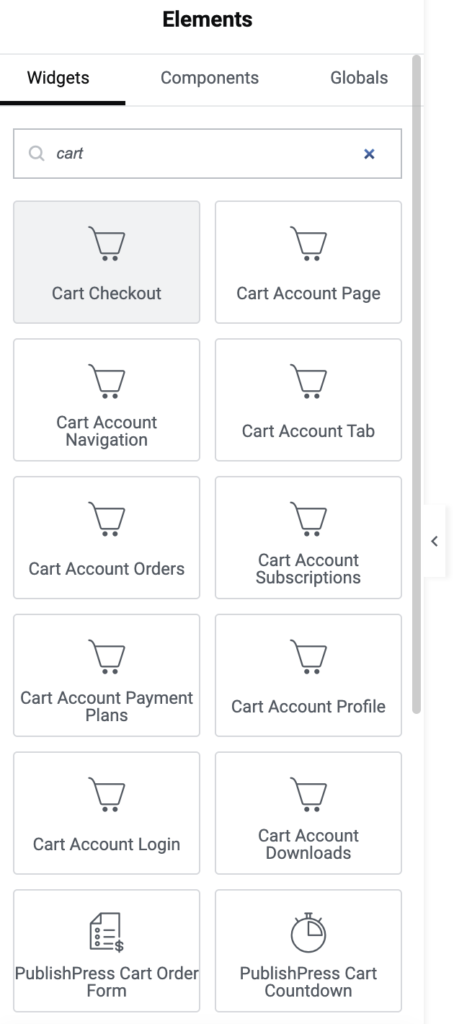
If you use Elementor, this release adds Cart layout widgets so you can place key Cart areas visually instead of relying on shortcodes.
Better coupon, tracking, and customer workflows
Store management is more flexible in 1.2.0. Several features that previously required extra setup or careful workarounds now have clearer screens and simpler options.
- Meta Pixel support: Go to Settings > Integrations > Ads and you can integratate with Facebook Ads. Install Meta Pixel and track when shoppers start checkout.
- Global coupons: In Cart Pro, you can manage store-wide coupons from their own screen while still keeping product-specific coupons available. You can find the new “Global Coupons” screen.
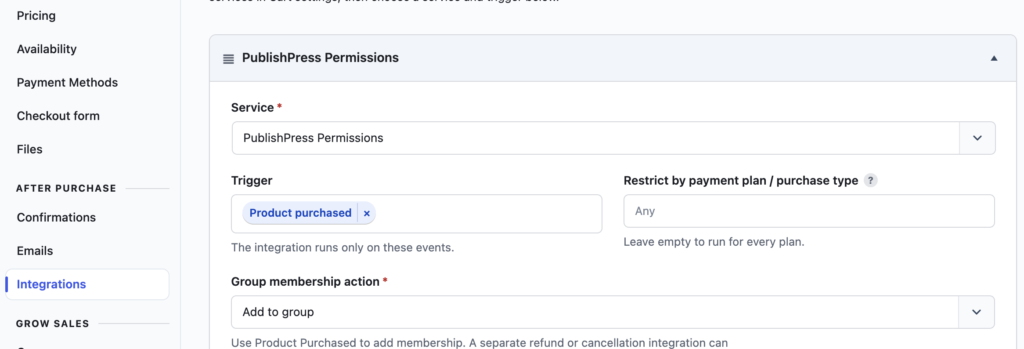
- Customer group actions: In Cart Pro, You can now add customers to PublishPress Permissions groups after purchase, which is useful for paid content, memberships, and private customer areas. Do this from the “Integrations” tab when setting up a product.
A smoother first run and clearer admin screens
New users will see a welcome screen after activation, and the Free version now does a better job of showing where Pro features fit into the Cart menu. The update also improves several labels and settings so the admin screens are easier to understand.
- Checkout offers: Labels are clearer for offers during checkout, offers after checkout, and subscription upgrades.
- Checkout design: The split checkout layout is now optional, and the design settings have clearer guidance.
- Block editor labels: Cart block names now begin with “Cart” so they are easier to identify in the block inserter.
- File uploads: Uploads now show progress and result messages, making it easier to know what happened.
Layout and reliability fixes
This release also includes fixes that make checkout pages and admin tools more reliable. Checkout content behaves better in narrow page areas, checkout shortcodes stay inside the page content width, and the dashboard widget has a cleaner layout.
- Product publishing: Products with missing required fields are now identified more clearly and cannot be published until they are complete.
- Stripe checkout: Repeated checkout and card setup requests are now limited to help prevent excessive or duplicate attempts.
- Related products: The related-product box is hidden when there are no products to show and works better with post revisions.
- White Label mode: Cart branding is hidden more consistently throughout the admin area when White Label is enabled.
- Affiliates and offers: New affiliates can be added again, and order bump choices are populated correctly for new products.
There are also smaller cleanups for tax rates, sale scheduling instructions, date controls, plugin naming on the Plugins screen, and duplicate navigation on the Affiliates screen.
This post provides an overview of the new features in this release of the PublishPress Cart plugin. The complete changelogs for both Free and Pro versions are available in our Docs area.
One plugin. Your site. All the sales.
PublishPress Cart helps you sell digital products, programs, events, or services from your WordPress website. It provides everything you need to make money with WordPress.
