
Move Gutenberg Metaboxes To and From the Sidebar
One of our most popular recent posts on this blog explained how to rearrange metaboxes in the Gutenberg editor. This post is useful because the system for moving metaboxes has some confusing points. Yes, you can move some metaboxes up and down, but the default boxes can not be moved. The image below highlights the difference between the default boxes and those added by plugins.
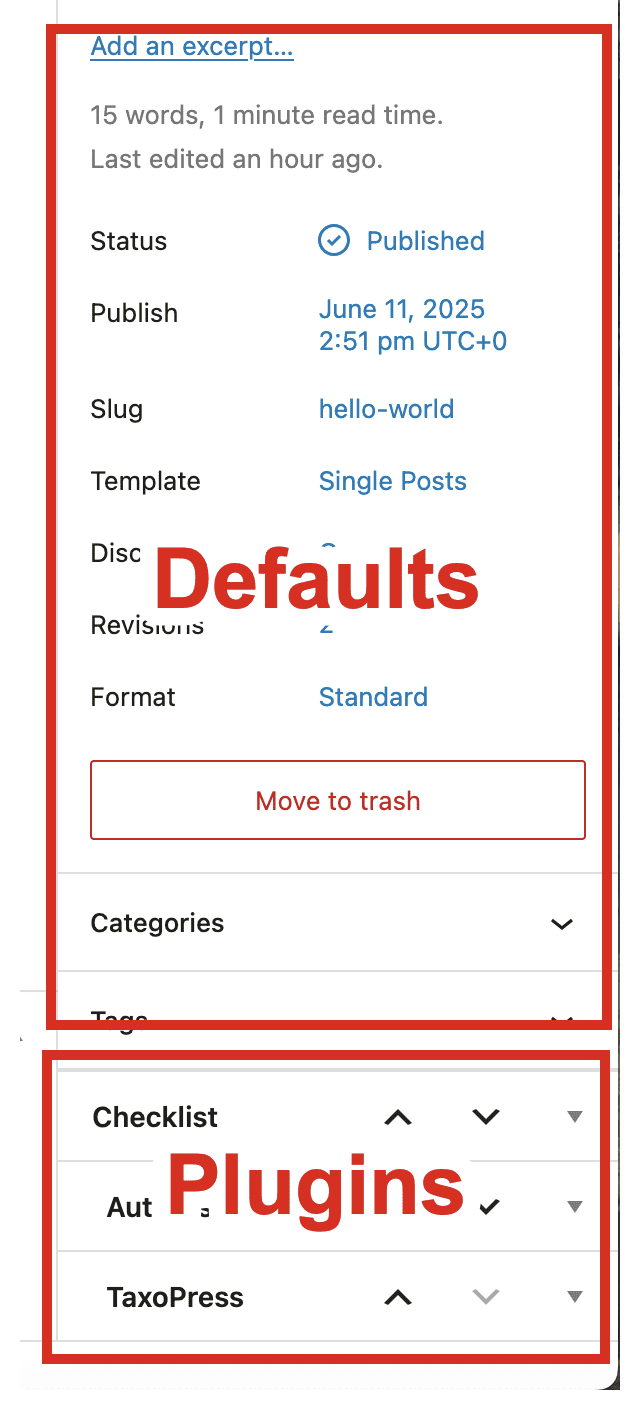
In the image above, it's not possible to move anything in the “Default” area. You can hide these metaboxes using the “Editor Features” option in the PublishPress Capabilities plugin, but they can not be re-ordered.
There is an additional point of confusion with these metaboxes. They can be moved to-and-from the sidebar.
In the image below, I want to move the “Yoast SEO Premium” metabox, so I click on the down arrow.

After clicking on that arrow, the metabox will jump into the right sidebar. This will only work when your metabox is at the bottom of the screen, otherwise it will only change the order of the metaboxes.

The reverse is also true. If your metabox is at top of the “From plugins” area and directly below “Discussion”, you can click the up arrow. This will move the metabox from the sidebar and back into the main content area.

Although Gutenberg is a step forward for WordPress, some elements are definitely confusing. We’ve also written about how to add GIF images and show code in Gutenberg, plus how to hide image captions. PS. if you really decide you don't enjoy using blocks, there are various ways you can disable the Gutenberg editor.
Long-term, we're very positive about Gutenberg. If you do want more options for your blocks in Gutenberg, check out the PublishPress Blocks plugin.

Table of Contents
The Best Plugin to Control Your WordPress Users
PublishPress Capabilities enables you to customize what users see in every area of WordPress from editing posts and pages to admin menus, profile pages.

Your Complete Toolkit for the WordPress Block Editor
PublishPress Blocks is the plugin that gives you more control over the WordPress block editor. You get a complete set of management tools for your blocks.

THANK YOU! This fix just saved me from going mad.