
PublishPress Permissions 4.9: Content Visibility Shortcodes and Live Teaser Previews
This post is about a release of PublishPress Permissions. This plugin to allows you to control who can view and edit your WordPress content. You can give very specific access to individual posts, tags, categories, and more.
PublishPress Permissions 4.9.0 is a feature rich update led by a new optional Content Visibility module, giving site owners a shortcode based way to show or hide parts of content for different users. This release also refreshes key admin screens, adds a live Teaser preview, improves onboarding, and includes several security and reliability fixes.
Table of Contents
New shortcodes to control content visibility
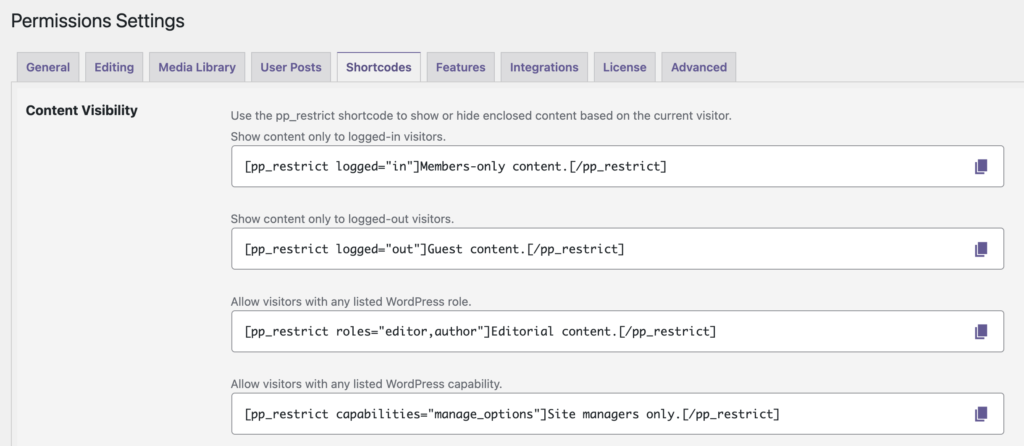
You can now use the [pp_restrict] shortcode to control who can see specific content inside a post or page. Restrictions can be based on login status, roles, capabilities, usernames, and PublishPress Permission Groups. Go to “Permissions”, then “Settings”, then “Shortcodes” and you’ll see examples for all the shortcodes.
Live Teaser preview
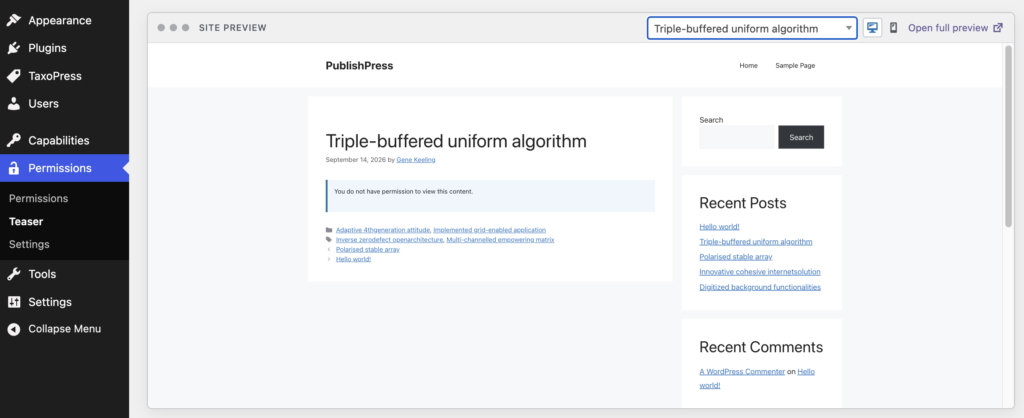
The Teaser settings screen now shows a preview rendered through your active theme, so you can see how restricted content messages will appear to visitors. On the “Teaser” screen, you can see choose from several options:
- WordPress default
- No Teaser Text
- Use content before “Read More” as Teaser text
- Use Excerpt as Teaser text
- Use first X characters of content as Teaser text
- Redirect to another post
This gives you detailed control what users see when they don’t have access to your content.
Other improvements and fixes
- Block All Pages control: The previous ambiguous “none” choice has been replaced with a clearer checkbox for blocking all Pages by default.
- Improved user permissions screen: User specific permissions now have a cleaner design that should make individual access rules easier to review and manage.
- Security hardening: Draft advisory paths, authorization checks, nonce checks, and role assignment handling have been tightened.
- Pro compatibility: Security advisory handling has been improved so it works correctly with the Pro version.
- CSP compliance: Content Security Policy compatibility has been improved to reduce security related browser restrictions.
- Assign Terms hierarchy: Term checklist hierarchy is now corrected when restrictions are applied to terms below the top level.
- Multisite uninstall handling: Site IDs are now processed more efficiently during uninstall instead of being loaded all at once.
- Module cleanup: The old presspermit collaboration module is no longer listed among deactivated modules.
- Cleaner dropdowns in Permissions: Permission Groups are now disabled by default in the Edit Permissions type selector.
This post provides an overview of the new features in this release of the PublishPress Permissions plugin. The complete changelogs for both Free and Pro versions are available in our Docs area.
Control access to your content
PublishPress Permissions allows you to enable or deny access to posts, pages, categories, tags and more. You can control who can view and edit your WordPress content.
