
Write, Plan and Publish Content Inside WordPress with PublishPress Planner
One of our key goals for this year is to help you replace expensive SaaS services. Why use Trello, ClickUp, Notion, or other products when you already have WordPress?
We took a big step towards that goal with the latest update of PublishPress Planner.
This version of the PublishPress Planner has new features and a slick, new user interface. It’s time to replace your expensive content management services. You can now write, plan, and publish your content entirely inside WordPress.
Table of Contents
How to Plan Content in WordPress
When you install the Planner plugin now, you’ll see three major screens. We’ve updated each of these screens so that they share the same new design and user interface. Each screen is designed to replicate features you’ll normally find in a content planning SaaS service. Each screen provides a different approach to planning your content.
- Content Calendar: This screen allows you to view and schedule your content by date. You can drag-and-drop content to a new publication date. You can click on any day in the calendar to create a new post on that date.

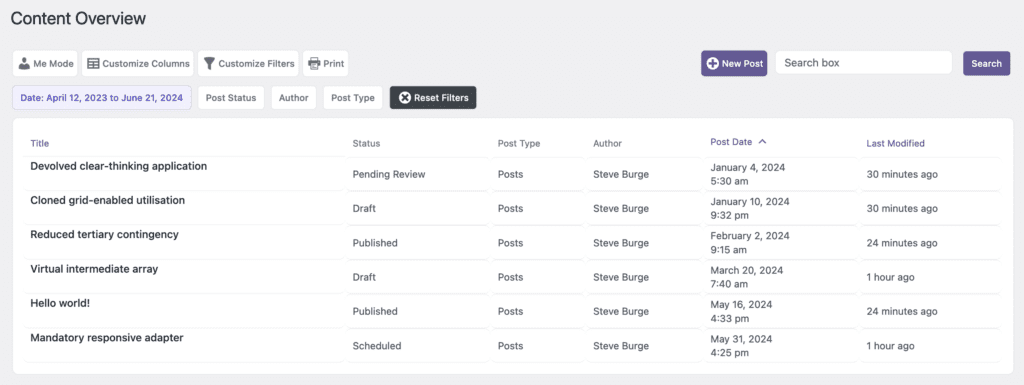
- Content Overview: This screen enables you to drill down and see content organized by status, categories, authors and much more. This is a high-powered version of the normal “Posts” screen. You can easily add your own columns and filters.
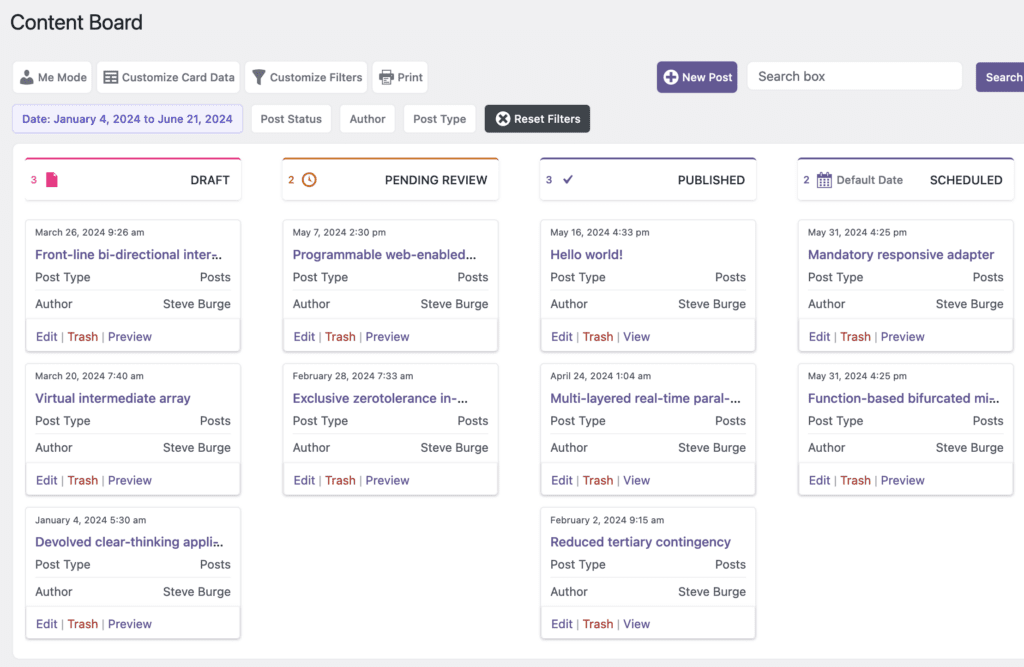
- Content Board: This screen is a kanban board for planning your WordPress content. You can drag-and-drop content to different statuses. This is the place to go when you want to see how your content is progressing. How many posts do you have in “Draft” or “Pending Review”? How many posts are scheduled to go live? You can expand this feature with custom statuses thanks to the PublishPress Statuses plugin.
To support this new focus, we’ve moved two PlublishPress Planner features to a “Legacy” state. Editorial Fields and Editorial Comments will no longer appear when you first enable the plugin. You can enable them by going to the “Settings” and then “Features” tab. We retired the Fields feature because there are better alternatives such as Advanced Custom Fields. And we retired the Editorial Comments feature because this is likely to soon arrive in the WordPress core.
However, we don’t think there’s any better alternative in WordPress to the features that now make up the core of PublishPress Planner.
New Editing Modals
If you’re using the Pro version of PublishPress Planner, you’ll find a new feature in each of the three main screens. Click a post title and you’ll see a new editing modal. This will give you full access to the post content. You’ll also be able to edit key details of the post, including the title, publishing date, post status, Tags, Categories, and more.
The goal behind adding these editing modals is to make it possible to do all your editing from these PublishPress Planner screens. You don’t have to leave these screens to visit other areas of WordPress.

Video Guide to the New Planner Features
PublishPress Planner Summary
When you’re using a SaaS tool to plan your content, your work is divided in a way that can’t be easily fixed.
In one common scenario, your content planning is done on the SaaS, but your actual content is in WordPress. It’s a real pain to plan in one place, and then work somewhere completely different.
Or in another scenario, both your planning and content are done on the SaaS, but you then have to move that content to WordPress. It’s never easy to move content from one platform to another, particularly if you then have to do updates.
So those are the problems we’ve solving with PublishPress Planner. Drop the expensive monthly subscriptions. Write, plan, and publish your content in one place with the PublishPress Planner plugin.

Create workflows for your WordPress content
PublishPress Statuses allows you to add custom statuses for your posts. You can use these statuses to create custom publishing workflows.

Plan and manage your WordPress content
PublishPress Planner has all the tools you need to plan and schedule WordPress content, including a scheduling calendar, Kanban Board, editorial notifications and more.
