
How to Add Authors to WooCommerce Products
By default, WooCommerce products don’t show the default “Authors” feature in WordPress.
The WooCommerce developers made this choice for a good reason. Posts, Pages and other content normally need an “author”. However, eCommerce products might have a “Vendor” or “Manufacturer”, but not often an “author”.
In this post, I’ll show you how to make the Authors feature visible again in WooCommerce.
Table of Contents
How to add authors to WooCommerce with a plugin
We’re going to the use the PublishPress Authors plugin for this.
- Install the “PublishPress Authors” plugin.
- Activate the plugin.
- Go to “Authors”, then “Settings”.
- Check the box for “Products”.
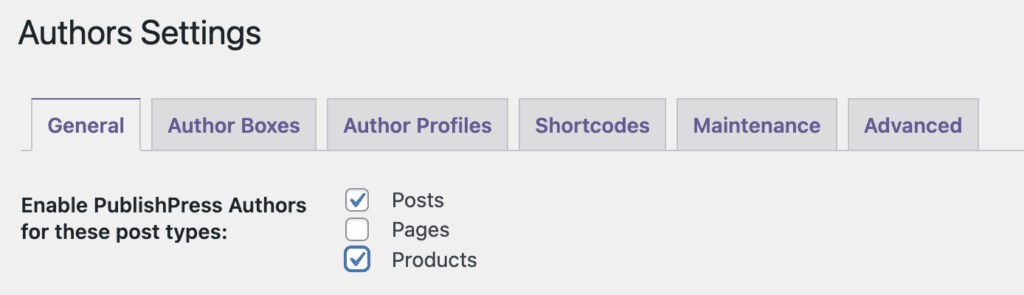
- Go to edit one of your WooCommerce products and you’ll now see the “Authors” feature is available in the sidebar, as in this next screenshot:

Other methods to add authors to WooCommerce
You can add this code to your theme’s functions.php file:
function add_author_support_to_products() {
   add_post_type_support( 'product', 'author' );
}
add_action( 'init', 'add_author_support_to_products' );
How to Add More Than One Author to WooCommerce
One of our users asked if it was possible to add more than one author to WooCommerce. Yes, absolutely. In this situation, it made perfect sense because the user was selling books! Each WooCommerce product really did have authors!
- Install the “Change Product Author for WooCommerce” plugin or use the code snippet above.
- Install the PublishPress Authors plugin.
- Go to Authors > Settings.
- Use this guide to place a PublishPress Authors widget in your site’s sidebar.
- Under “Add to these post types”, select “Products”.
- Click “Save Changes”.
- Go and edit one of your WooCommerce products.
- Select the authors of your product using the “Authors” box in the right sidebar.

- Publish your content and you’ll see the product authors are now visible:

Get PublishPress Authors Pro and the other Pro plugins
Join PublishPress today and you’ll get powerful publishing and permissions plugins to improve your WordPress site.

The author profile plugin for WordPress
The PublishPress Authors plugin allows you to create beautiful profiles for your site’s authors. You can add social media links, recent posts, custom layouts and much more.
