
Use Synonyms to Clean Up Your WordPress Tags
Tags and Categories are a great way to organize WordPress content. With one click, you can create a Tag or Category that can connect all the stories on your site.
If you have a large number of authors, or have just been writing for a while, you may have noticed that some of the terms are duplicated. Here are some examples:
- You have terms for “Joe Biden”, “Biden” and “President Biden”, even though they are the same person.
- You really just need one “movies” tag but have terms for “movie” and also “movies”.
- You want a single “soccer” term that can connect content in different languages, such as “soccer”, “football”, “futbol”, “calcio”.
In this guide, I'll show you one way to avoid those duplicate terms.
Table of Contents
Solving Duplicate Terms with Synonyms
TaxoPress is a very commonly used plugin for managing your WordPress terms. One popular feature is to use TaxoPress to add Tags and Categories to any post types.
The Pro version of TaxoPress has a feature called “Synonyms” which allows you to have multiple words associated with a single term.
When TaxoPress scans your posts and finds a “Synonym”, it will act as if it has found the main term. Here's an example of how that works. In the screenshot below, the main name for the term is “Movies”. The synonyms are “Movie”, “Film”, “Films”, “Cinema”, and “The Movies”.
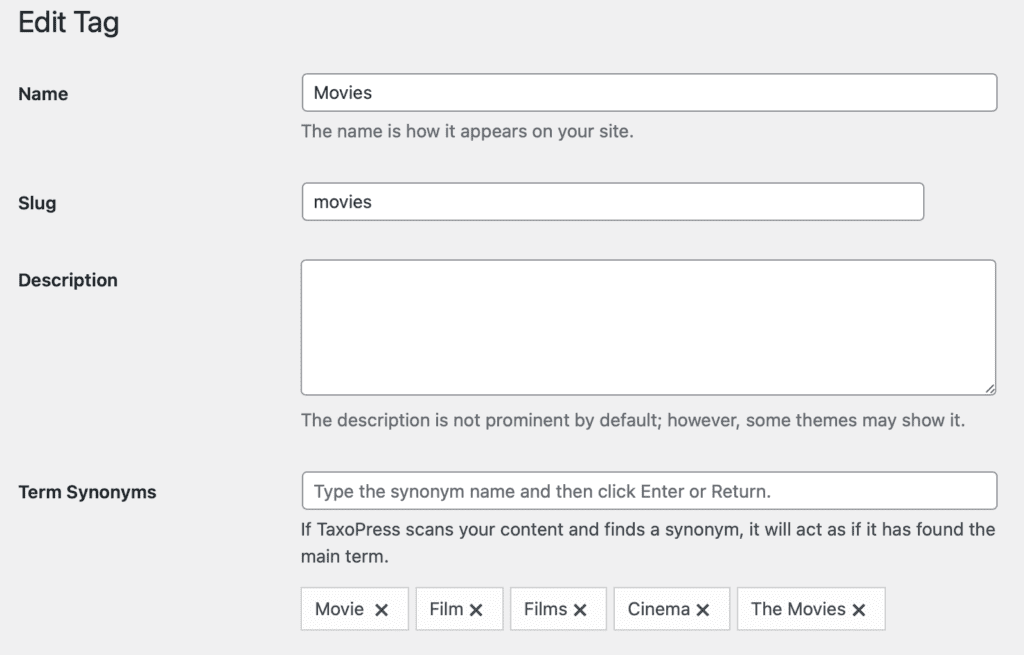
The Synonyms feature connect with two key features of TaxoPress called Auto Terms and Auto Links.
We mentioned the Auto Terms feature before. With Auto Terms, TaxoPress will add the original term to the post if it finds a synonym in the content. So if you have “Movie”, “Film” or “Cinema” in your post content, TaxoPress will add the term “Apple” to your post.
With Auto Links, there is a setting to enable the use of synonyms. If you check the box in the screenshot below, TaxoPress will add links to any synonyms in your post. So if you have “Movie”, “Film” or “Cinema” in your post content, those words will be linked to the archive page for “Movies”.

Do More With WordPress Terms
If you run a busy publishing site with WordPress, you can really take advantage of the power available with WordPress terms.
TaxoPress is a great place to start managing your terms.
You can use the PublishPress Permissions plugin to stop WordPress users from creating new tags and to automatically create specific tags for some user roles.
The PublishPress Checklists plugin allows yo to choose a maximum or minimum number of tags for any post.

The Best Plugin to Plan and Manage Your WordPress content
PublishPress Planner has all the tools you need to plan and schedule WordPress content, including a Content Calendar, Kanban Board, editorial notifications and more.

The Best Plugin to Control Access to Your WordPress Content
PublishPress Permissions allows you to enable or deny access to posts, pages, categories, tags and more. You can control who can view and edit your WordPress content.

Publish Consistently Excellent Content in WordPress
When you use PublishPress Checklists, you can define tasks that authors must complete before content is published. You can ensure that all your WordPress posts meet your high standards.
