
Five Plugins to Customize the WordPress Login Page
If you run a WordPress agency, customizing the login experience for the sites you build is a great way to promote your agency and build brand recognition.
Here are some helpful plugins to customize the WordPress login screen. These plugins will keep your agency top-of-mind with the site owner when they need changes or new features.
Table of Contents
Types of plugins to customize the WordPress login screen
There are four types of plugins that are commonly used to customize login pages in WordPress:
- Small plugins that only modify the logo.
- Page builders that can be used to build an entire site, including a custom login page.
- Form builders that can be used to create a wide variety of forms, including a login form.
- Plugins dedicated solely to customizing and managing the login process.
This post will focus on this last category of plugins: those that are feature-built for customizing the WordPress login experience.
Choosing the best plugins to customize the WordPress login screen
After a careful review of the WordPress plugin repository, five plugins stood out as fitting the above criteria and having a sizable user base. We compared the active install count and features of each plugin and summarized them in the table below.
Common among most of the plugins are the ability to change the logo, background and colors on the login page. And most of the plugins use the familiar theme customizer, which reduces the learning curve for new users.
Perhaps more interesting are the less-common features, such as custom URLs, the ability to redirect the user after logging in, automatically selecting the Remember me option, and the ability to export customizations for use on other sites.
Below we will highlight the unique features of each plugin.
| Feature | Colorlib Login Customizer | LoginPress | Ultimate Dashboard | Custom Login Page Customizer | Theme My Login |
|---|---|---|---|---|---|
| Active installs | 70,000 | 200,000 | 30,000 | 80,000 | 100,000 |
| Uses native theme customizer |  | | | |  |
| Pre-built templates or layouts | |  | | | |
| Custom text strings | | | | | |
| Custom logo | | | | | |
| Custom background image | | | | | |
| Custom background video | | | | | |
| Custom URLs | | | | | |
| Custom CSS | | | | | |
| Custom colors | | | | | |
| Hide footer links | | | | | |
| Auto remember me | | | | | |
| Redirect after login | | | | | |
| Frontend login | | | | | |
| ReCaptcha support | | | | | |
| Developer branding | | | | | |
| White label backend | | | | | |
| Import/export customizations | | | | | |
| Role-based access permissions | | | | | |
Recommended plugins for customizing the WordPress login
Colorlib Login Customizer
Like many of the plugins we examined, the Colorlib Login Customizer makes it easy to change the logo, background image, and colors of the WordPress login page.
One advantage of this plugin is that the free version includes a few very presentable templates that serve as a great starting point for further customization.
However, the lack of custom URLs and the ability to reuse customizations on other sites may make this plugin less attractive to agencies who focus on consistent processes and workflows.

LoginPress
LoginPress has the largest user base of all the plugins we examined. We suspect its popularity is due to the detailed customization options available for nearly every aspect of the login page.
As shown in the screenshot below, pixel-perfect tweaks can be made easily with familiar sliders, color pickers, and feature toggles. Additionally, it is the only plugin that has background videos as a feature!
On the other hand, the templates in this plugin are restricted to the premium version. Additionally, the branding of the developer is displayed by default when this plugin is activated (though it can be disabled easily).

Ultimate Dashboard
The Ultimate Dashboard plugin is a full-featured login designer. A few unique features make it stand out from the crowd. For example, you can easily modify the URL for the login page.
As shown in the screenshot below, you can also redirect users with different roles to different URLs. For example, a subscriber on your site could be redirected to a frontend URL while administrators could redirect to the backend dashboard as normal.
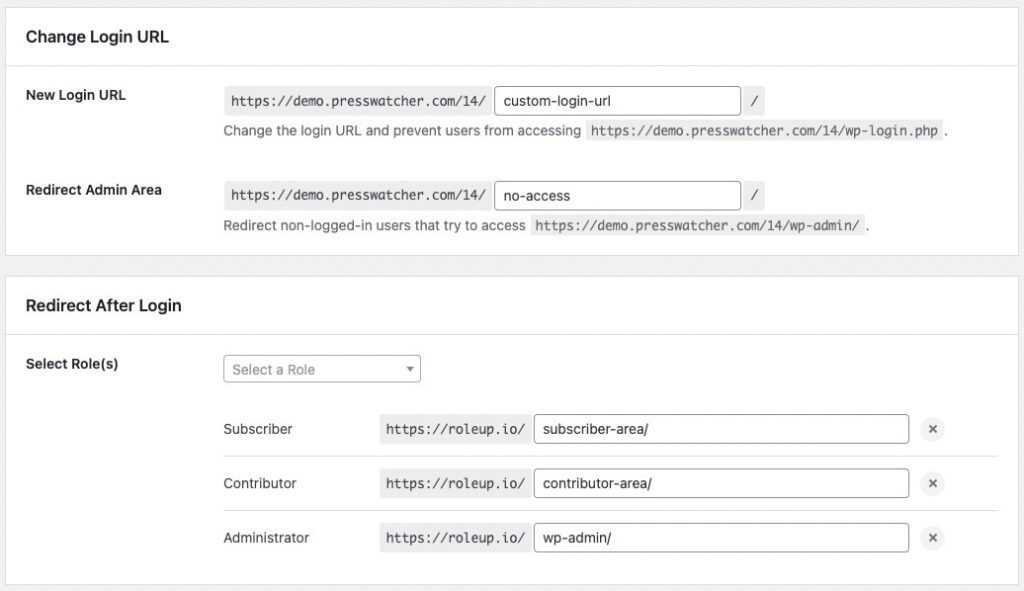
Additionally, Ultimate Dashboard is one of only two of the plugins we compared that includes an export/import system to use the customized login on other sites.
The ability to fully customize the WordPress backend and restrict access based on user roles is another unique feature of Ultimate Dashboard. However, this powerful feature is restricted to the Premium version, along with the pre-built layouts. For a free plugin that controls user access, try the PublishPress Capabilities plugin.
One missing feature that would be welcome is the ability to customize the text strings that appear on the login page. Both Colorlib Login Customizer and LoginPress include this feature.
Custom Login Page Customizer
Custom Login Page Customizer is similar in usage and features to the Colorlib Login Customizer. But there are two important differences.
Firstly, Custom Login Page Customizer does not allow you to modify the text that is displayed on the login page. In contrast, this feature is available in Colorlib Login Customizer.
Secondly, Custom Login Page Customizer includes the automatic remember me feature we first saw with LoginPress.
Theme My Login
Theme My Login stands a bit apart from the other plugins described above. Rather than customize the existing backend login page, Theme My Login uses a frontend login page that leverages the existing colors and features of the active WordPress theme.
As such, customizing the colors, fonts and CSS is mostly left to the main site theme.
As a frontend login solution, separate and customizable URLs are available for the different features of the login page, such as resetting the password and logging out (see screenshot below).

Best free plugins to customize the WordPress login
Choosing the best plugin from our list really depends on the needs of you and your organization. Rather than choose our favorite, here are some common use-cases paired with the best-matched plugin.
- White labeling and access control: Ultimate Dashboard (requires the Premium version)
- Most features: LoginPress
- Exporting and reusing customizations: LoginPress & Ultimate Dashboard
- Frontend login only: Theme My Login
- Custom text strings: Colorlib Login Customizer
- Automatic Remember me: Custom Login Page Customizer

The Best Plugin to Control Your WordPress Users
PublishPress Capabilities enables you to customize what users see in every area of WordPress from editing posts and pages to admin menus, profile pages.
