
PublishPress Checklists Has a New Interface and OpenAI Integration
With the PublishPress Checklists plugin, you can choose pre-publishing requirements for your content.
We’ve just released version 2.10, which has a new interface and also integrates with OpenAI.
In this guide, I’ll show you how the interface makes PublishPress Checklists easier to use. I’ll also explain how to use OpenAI to automatically scan and approve your content.
Table of Contents
Video Introduction to Checklists and OpenAI
The New Interface
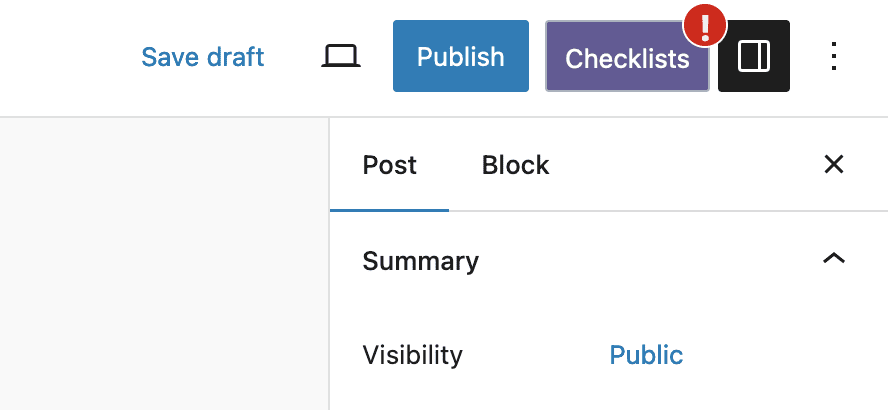
This screenshot below shows the previous version of PublishPress Checklists. There is a red exclamation mark over the “Publish” button. This happens if the checklist requirements aren’t met. There were two problems with this approach:
- It wasn’t immediately obvious to users that the red exclamation mark was from the PublishPress Checklists plugin.
- There was no easy way to view the list of missing requirements. You had to find and open the “Checklists” metabox down in the sidebar of the post editing screen.

In the new version of the plugin, we’ve introduced a separate “Checklists” button. This makes it immediately clear that there is an issue with the pre-publishing requirements
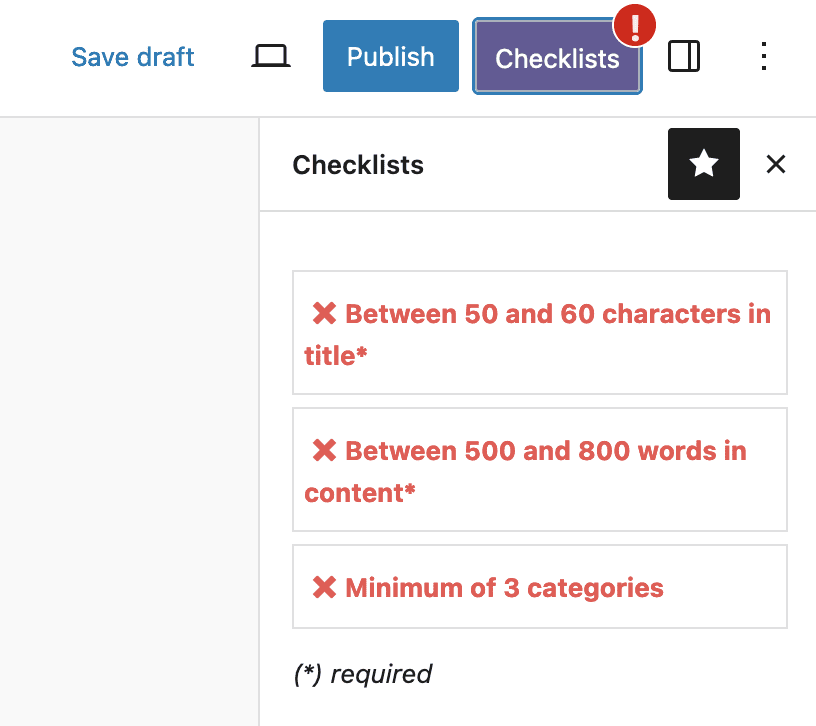
Also in the new version, when you click on the “Checklists” button, the requirements are instantly visible. You don’t have to go searching for the “Checklists” metabox.
The New OpenAI Integration
This version of PublishPress Checklists integrates with OpenAI. You can use prompts to analyze your content. To demonstrate how this works, we’ve provided several examples. You can create checklist requirements like these:
- “Is the content clear and easy to read?”
- “Is the tone of this content professional?”
- “Does this article use correct grammar?”

As an example, this screenshot below uses the text from the About WordPress article. The checklist requirement was “Is the content clear and easy to read?” OpenAI has scanned the content and given a detailed verdict. The content is approved as clear and easy to read.

In this next screenshot, I’ve used the same requirement to analyze a passage by the author James Joyce. The passage may have many literary merits, but OpenAI confirms that the passage is neither clear nor easy to read.

In this next example, I’ve changed the requirement. This time the prompt is “Does this article use correct grammar?”

To test this prompt, I took a BBC article and added some spelling and grammar mistakes. OpenAI analyzed the article, and as you can see in the screenshot below, it provided details of all the mistakes.

OpenAI is smart enough to recognize the difference between deliberate spelling variations and accidental mistakes. In this next example, I’ve used an article about the Appalachian English dialect. OpenAI responds that the grammar used in the article is specific to a regional variation.

More about PublishPress and AI
Over the next few months we’ll be adding more AI tools to PublishPress plugins. However, we only want to do to it thoughtfully and when it adds value. Our goal here at PublishPress is to help publishers succeed and we do that by helping you create content. You probably won’t see us building plugins to generates masses of low-quality AI content.
Over at the TaxoPress plugin, we have an AI tool that scans your content and adds relevant tags and categories. That feature automates a task that used be slow and tedious. The same is true with this new OpenAI feature in PublishPress Checklists. You can use OpenAI to scan your content and give accurate feedback.

Make sure all your posts meet your standards
When you use PublishPress Checklists, you can define tasks that authors must complete before content is published. You can ensure that all your WordPress posts meet your high standards.
