
The Downsides of Sharing WordPress User Accounts for Web Design Agencies
The common practice of sharing WordPress user accounts makes it easy for agencies to provide site access for both developers and maintainers. But this practice has many downsides.
As we’ll discuss below, we don’t recommend sharing WordPress user accounts in any professional setting.
Table of Contents
What are WordPress user accounts?
Access to the WordPress backend is controlled by a roles and capabilities system within the software itself. Every WordPress user account has a role assigned, and each role has specific capabilities.
For example, the WordPress installer creates a user account. This account is given the administrator role, which includes all the capabilities in WordPress. In other words, the administrator has access to the entire site, from installing plugins, publishing posts, and even creating new user accounts.
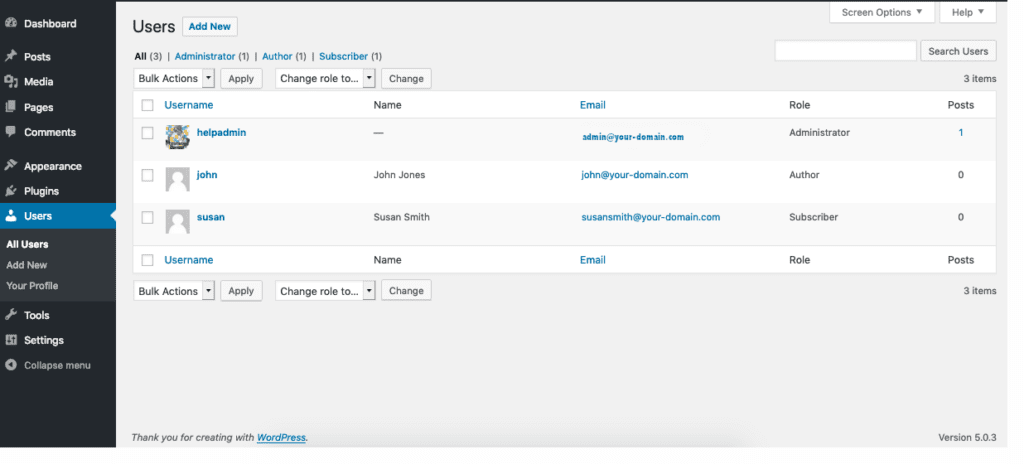
Because this role has no restrictions, administrators are commonly used when developing and maintaining WordPress sites. User accounts for administrators and other roles are managed in the WordPress Users area (below).
Why share WordPress user accounts?
Web design agencies take a lot of care when building and maintaining websites for their clients. To meet the clients goals, this often requires a team of people, including frontend developers, backend developers, software maintainers, SEOs, marketing professionals, and content creators to name a few.
In an ideal world, each team member would have their own user account with a strong password. But as the team size grows, maintaining separate user accounts can be tedious.
In an agency with many websites, tedium can quickly grow to complexity as someone will need to keep track of which users have access to which sites.
Staff turnover and rotating vacation schedules adds yet another wrinkle to the problem of user management.
As a result, it is surprisingly common for agencies to share the credentials of the site administrator among a number of people.
The downsides of sharing user accounts
Lack of accountability
No matter how skilled a team is, mistakes will inevitably occur when developing and maintaining a website. With the appropriate monitoring and intervention, the best agencies fix these errors quickly and put in place procedures to prevent them from happening again.
In order to do this effectively, knowing the source of the error is critical to both fixing the problem and preventing it from recurring. And in a team setting, it is thus critical to track errors to specific team members.
This is very difficult when team members are using the same credentials to log into the WordPress admin.
By assigning each team member their own user accounts, identifying the source of errors is much easier. Simply use a plugin like Logtivity to track exactly what each user is doing on your sites.
Password confusion
In WordPress, user accounts require an associated email address. Anyone with access to that email address can then reset the password.
As a result, shared WordPress account passwords change unexpectedly and without notice. When someone tries to log in with the old password, confusion and delays often result.
And It’s not uncommon for an agency to get stuck in a password reset loop!
Individual user accounts avoids this problem entirely.
Reduced security best-practices
To maximize security in an information system like WordPress, it is wise to apply the Principle of Least Privilege. This approach restricts access to only the information and resources that are necessary for a person’s “legitimate purpose”.
For example, consider a copywriter creating posts requiring the approval of a marketing manager. You could assign specific WordPress roles to each of these individual user accounts. By assigning author and editor roles to the copywriter and marketing manager respectively, each user would only have the least amount of capabilities needed.
Importantly, neither would have any ability to install or remove plugins, or change the theme, as these are restricted to the administrative role.
Using the Principle of Least Privilege helps keep WordPress sites safe. it is not compatible with sharing user accounts.
Inability to delete user accounts
The ability to modify, disable, and/or delete user accounts is a useful tool for mitigating unauthorized access to your site or managing problematic users. It can also be useful in removing access when a team member leaves your agency.
When sharing user accounts, addressing these issues is difficult or impossible without affecting team access to the website.
Blocking a user account is much simpler when each person has their own account. And when deleting an account, re-assigning existing posts and comments to another user is a feature built into WordPress.

Inability to obtain E & O insurance
Errors and Omissions (E & O) insurance is a type of liability insurance that is common for service providers. For technology companies like web agencies, the underwriter of the policy will typically require a number of security best practices like strong password policies and 2-factor authentication.
Sometimes they will require details about any shared resources that might represent a security weak point. They may also require user tracking and logging.
Thus, using a shared user account can prevent you from obtaining E & O insurance, or may be used to deny coverage for an existing policy.
Alternatives to sharing accounts
Rather than share user accounts in WordPress, we recommend a separate account for each person on your team for each site you manage.
Administering all these accounts, keeping track of the roles assigned to each account on each site, and applying the principle of Least Privilege can be a big task.
Depending on the size of your team and the number of sites you manage, a spreadsheet might be sufficient to manage all of the relevant details.
However, there are other alternatives to consider, especially as your agency scales.
Single sign-on
Single sign-on (SSO) is an authentication system where a single user account is managed centrally and roles/capabilities are assigned to each site.
There are a number of SSO plugins and tools available for WordPress. If you are using a bulk site management tool like Watchful to backup and update your website, it comes with SSO baked in. One benefit of this approach is that you can reset the password or update the account details for a user across all your sites at once.
